11.2. How to Conduct Streaming Replication
Streaming replication comprises two primary aspects: log shipping and database synchronization.
- Log shipping: This is the core mechanism in which the primary server continuously transmits WAL data to connected standby servers as it is written.
- Database synchronization: This is specific to synchronous replication, where the primary server coordinates with each standby server to ensure their database clusters remain synchronized.
Accurately understanding streaming replication requires knowing how one primary server manages multiple standby servers. This section starts with a simple case (a single-primary single-standby system) before discussing the general case (single-primary multi-standby system) in the next section.
11.2.1. Communication Between a Primary and a Synchronous Standby
Assume the standby server is in synchronous replication mode, the hot_standby parameter is disabled, and wal_level is set to ‘replica’. The primary server configuration is as follows:
synchronous_standby_names = 'standby1'
hot_standby = off
wal_level = replica
Among the three triggers to write WAL data mentioned in Section 9.5, this section focuses on transaction commits.
Suppose one backend process on the primary server issues a simple INSERT statement in autocommit mode. The backend starts a transaction, issues the statement, and commits immediately. Figure 11.2 shows the sequence of this commit action:
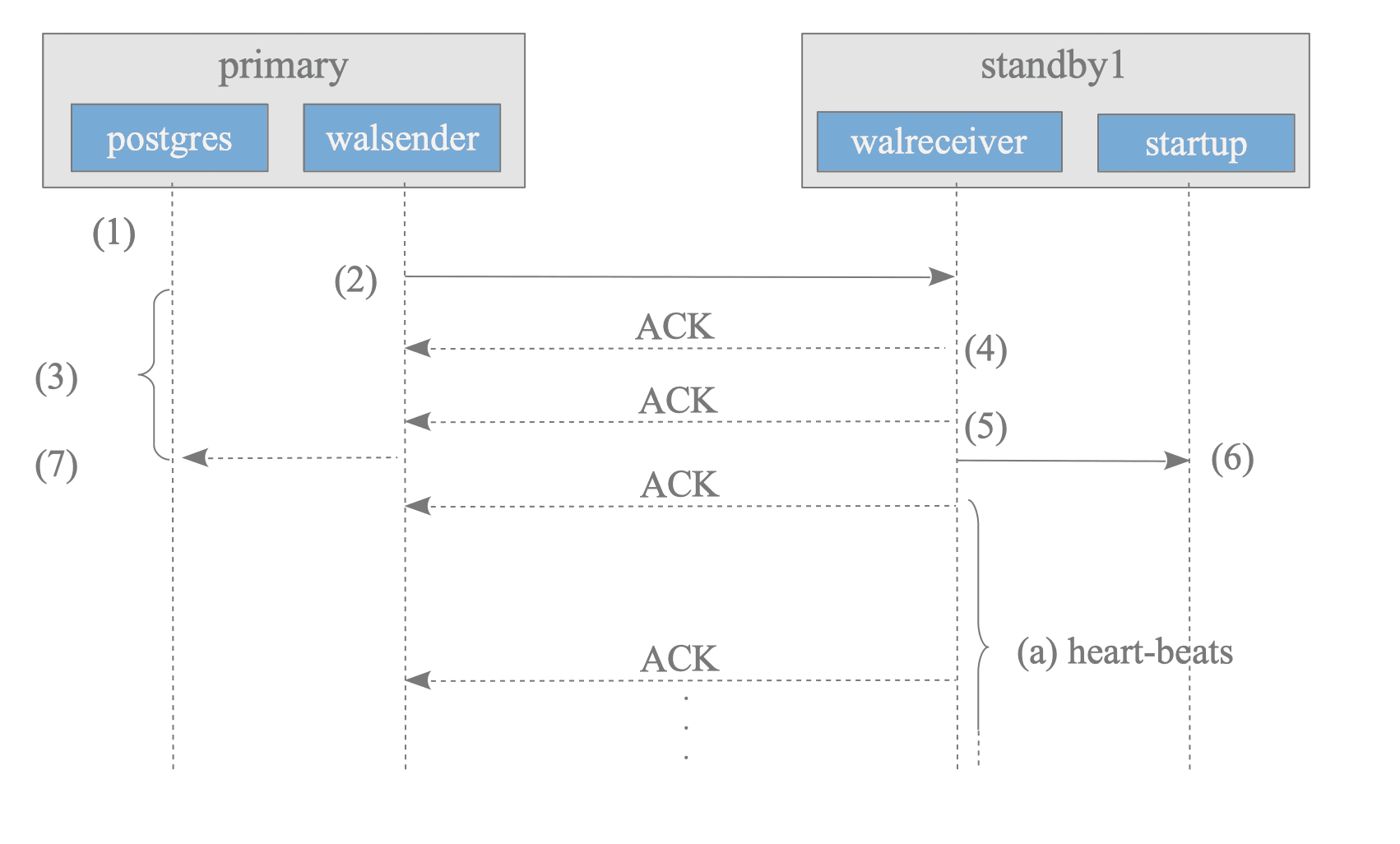
Figure 11.2. Streaming Replication's communication sequence diagram.
-
The backend process writes and flushes WAL data to a WAL segment file by executing XLogInsert() and XLogFlush().
-
The walsender process sends the WAL data from the WAL segment to the walreceiver process.
-
After sending the data, the backend process waits for an ACK response from the standby server. Specifically, the backend process obtains a latch via the internal function SyncRepWaitForLSN() and waits for its release.
-
The walreceiver on the standby server writes the received WAL data into the standby’s WAL segment using the write() system call and returns an ACK response to the walsender.
-
The walreceiver flushes the WAL data to the WAL segment using fsync(), returns another ACK response to the walsender, and informs the startup process that the WAL data has been updated.
-
The startup process replays the WAL data written to the WAL segment.
-
The walsender releases the backend process latch upon receiving the ACK response from the walreceiver. The backend process then completes the commit or abort action. The timing for this release depends on the synchronous_commit parameter:
- If set to ‘on’ (default), the latch is released when the ACK from step (5) is received.
- If set to ‘remote_write’, the latch is released when the ACK from step (4) is received.
Each ACK response informs the primary server of the standby’s internal status. It contains four items:
- The LSN location where the latest WAL data has been written.
- The LSN location where the latest WAL data has been flushed.
- The LSN location where the latest WAL data has been replayed by the startup process.
- The timestamp when the response was sent.
The walreceiver returns ACK responses when WAL data is written or flushed, and periodically as a heartbeat. Consequently, the primary server always maintains an accurate status for all connected standby servers.
The following query displays the LSN-related information of connected standby servers:
testdb=# SELECT application_name AS host,
        write_location AS write_LSN, flush_location AS flush_LSN,
        replay_location AS replay_LSN FROM pg_stat_replication;

   host   | write_lsn | flush_lsn | replay_lsn
----------+-----------+-----------+------------
 standby1 | 0/5000280 | 0/5000280 | 0/5000280
 standby2 | 0/5000280 | 0/5000280 | 0/5000280
(2 rows)The heartbeat interval is set by the wal_receiver_status_interval parameter (default: 10 seconds).
11.2.2. Detecting Failures of Standby Servers
Streaming replication uses two common failure detection procedures:
-
Failure detection of standby server process:
- The primary server immediately determines a failure if it detects a connection drop between the walsender and walreceiver.
- The primary server also immediately determines a failure if a low-level network function returns an error while accessing the walreceiver socket.
-
Failure detection of hardware and networks:
- The primary server determines a failure if a walreceiver does not respond within the wal_sender_timeout period (default: 60 seconds).
- Confirming a standby’s failure can take up to wal_sender_timeout seconds if the standby cannot send responses due to hardware or network failures.
Failure detection is not always immediate and may involve a time lag depending on the cause of the failure.
11.2.3. Handling Failures in Synchronous Replication
The behavior of the primary server is critical when a synchronous standby server fails.
If the standby fails and stops returning ACK responses, the primary server waits for those responses indefinitely. Because streaming replication lacks a mechanism to automatically revert to asynchronous mode after a timeout, all primary server operations — including transaction commits and subsequent query processing — stop until the failure is detected and resolved.
To avoid a complete halt of primary operations, consider the following strategies:
- Increase availability: Use multiple standby servers so the primary can continue operating if one fails.
- Manual failover to asynchronous mode: If a permanent failure is detected, the mode can be switched from synchronous to asynchronous by performing the following steps:
- Set the parameter synchronous_standby_names to an empty string.
synchronous_standby_names = '' - Execute the pg_ctl command with the reload option.
This procedure does not affect connected clients. The primary server continues to process transactions, and all sessions between clients and their backend processes are maintained.
$ pg_ctl -D $PGDATA reload
- Set the parameter synchronous_standby_names to an empty string.
11.2.4. Conflicts
In streaming replication, standbys can execute SELECT commands independently of the primary server. However, conflicts can arise between the standby and the primary server under certain conditions, potentially leading to errors.
Figure 11.3 shows a typical example: the primary server drops a table that the standby server is selecting.
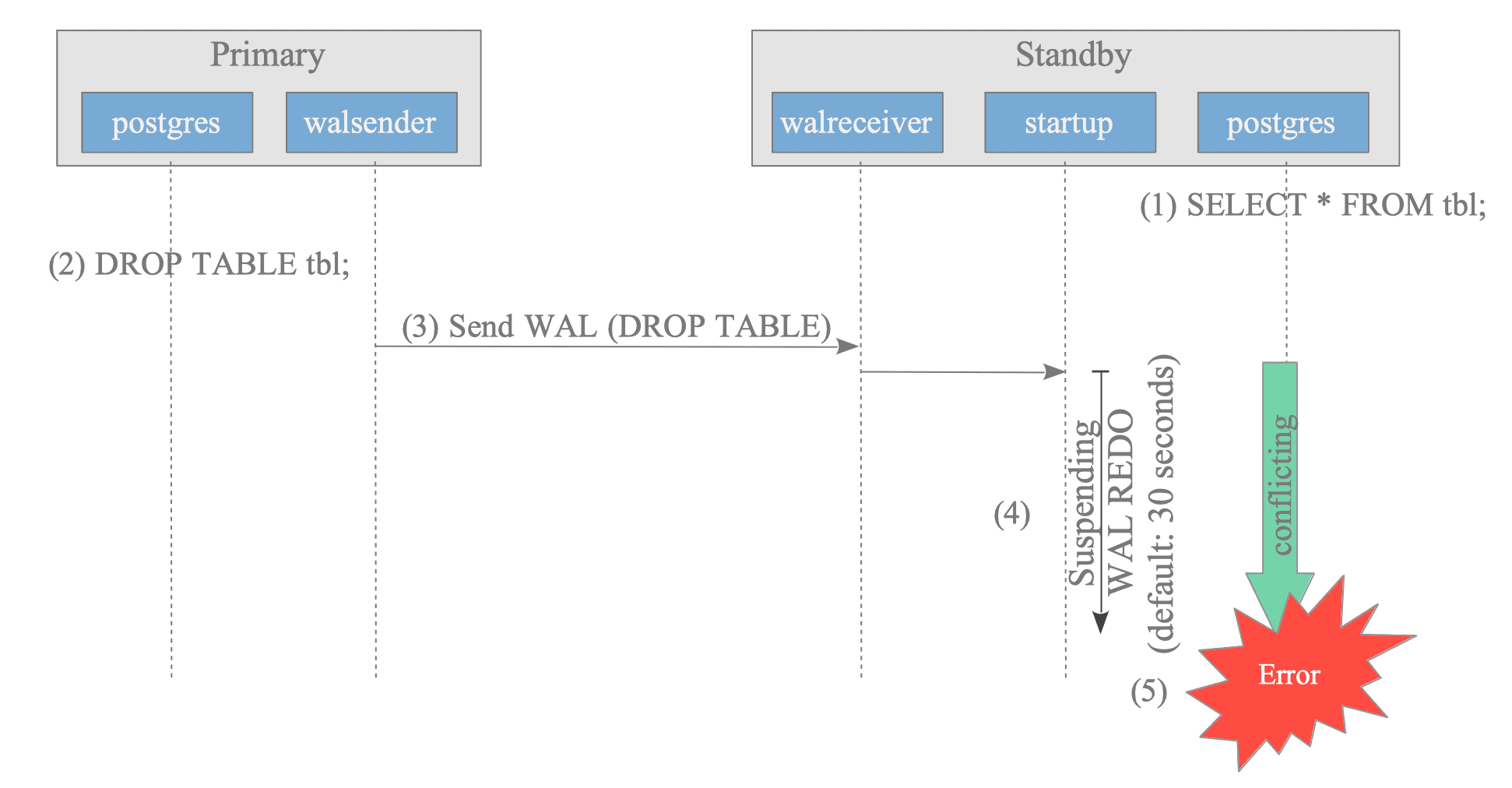
Figure 11.3. Conflict caused by DROP TABLE.
- The standby server selects a table.
- The primary server drops the table that the standby server is currently selecting.
- The primary server sends XLOG records related to the DROP TABLE command.
- The standby server suspends replaying the WAL data for the DROP TABLE command for 30 seconds by default (configurable with max_standby_archive_delay or max_standby_streaming_delay).
- If the conflict is not resolved within the specified time (i.e., the SELECT command does not complete), the SELECT command returns an error and terminates.
- Primary
testdb=# -- Primary


testdb=# DROP TABLE tbl;
DROP TABLE


testdb=#- Standby
testdb=# -- Standby
testdb=# SELECT count(*) FROM tbl;


ERROR:  canceling statement due to conflict with recovery
DETAIL:  User was holding a relation lock for too long.
The cause of this conflict is the WAL data generated by the Access Exclusive Lock acquired internally by the DROP TABLE command on the primary1. This WAL data conflicts with the standby’s SELECT command. (As described in Section 9.5.1, WAL data includes not only changes to data but also lock information.)
According to the official documentation, the causes of conflicts fall into three types:
-
Access Exclusive Locks on the primary server: These conflict with any lock on the standby. Refer to the official documentation for commands that acquire these locks, such as LOCK IN ACCESS EXCLUSIVE MODE, DROP TABLE, TRUNCATE, REINDEX, and VACUUM FULL.
-
Dropping databases or tablespaces.
-
Applying a vacuum cleanup record from WAL: This occurs if standby transactions can still see rows being removed or if queries are accessing the affected page.
Here is another example: the primary server deletes rows and performs the VACUUM command on a table being selected by the standby.
- Primary
testdb=# -- Primary


testdb=# DELETE FROM FROM tbl
testdb-#      WHERE data > 100000;
DELETE 1050

testdb=# VACUUM tbl;
VACUUM


testdb=#- Standby
testdb=# -- Standby
testdb=# SELECT count(*) FROM tbl;


ERROR:  canceling statement due to conflict with recovery
DETAIL:  User query might have needed to see row versions that must be removed.
Conflicts caused by VACUUM processing are particularly troublesome because they occur during both explicit VACUUM commands and autovacuum operations (described in Section 6.5).
11.2.4.1. Mitigating Conflicts Caused by Locking
On standby servers, increasing the values of max_standby_archive_delay and max_standby_streaming_delay (default: 30 seconds) mitigates conflicts. These settings allow the standby to delay replaying WAL data, reducing the likelihood of errors.
However, these parameters cannot always eliminate conflicts.
Additionally, they affect other backends on the standby by preventing them from accessing the latest data during the delay. Consequently, the standby server is not fully synchronous during such conflicts.
Administrators must configure these parameters while carefully considering these operational trade-offs.
11.2.4.2. Avoiding Conflicts Caused by Vacuum Processing
On the primary server, setting the hot_standby_feedback parameter (default: off) to “on” avoids vacuum-induced conflicts. Based on the standby’s state, the primary delays deleting data that the standby still needs.
The standby sends its state to the primary at intervals defined by wal_receiver_status_interval (default: 10 seconds).
While hot_standby_feedback resolves vacuum conflicts, it has drawbacks for the primary server:
- Table and Index Bloat: Retaining old tuples visible to the standby prevents vacuuming, which increases table and index bloat on the primary.
- WAL Accumulation Issues: Accumulating additional data for standby consistency can increase WAL usage.
Querying the pg_stat_database_conflicts view on a standby server displays the causes and number of conflicts:
testdb=# -- Standby
testdb=# \x
Expanded display is on.
testdb=# SELECT * FROM pg_stat_database_conflicts WHERE datname = 'testdb';
-[ RECORD 1 ]------------+-------
datid                    | 16384
datname                  | testdb
confl_tablespace         | 0
confl_lock               | 1
confl_snapshot           | 1
confl_bufferpin          | 0
confl_deadlock           | 0
confl_active_logicalslot | 0Until version 15, the vacuum_defer_cleanup_age parameter supported deferring the deletion of dead tuples. If set to a positive number, vacuum operations deferred deleting dead tuples for the specified number of transactions.
This parameter was removed in version 16 because it could not always eliminate conflicts.
Using hot_standby_feedback and Replication Slots (described in Section 11.4) manages conflicts more effectively.
-
This conflict state is an intentional design feature provided to grant a grace period that prevents immediate query errors on the standby.
When the primary drops objects currently accessed by the standby, streaming replication enters this conflict state. To notify standbys of this state, PostgreSQL records the acquisition of Access Exclusive Locks in XLOG.
Note that these records are created specifically for replication rather than standard recovery. Consequently, PostgreSQL does not create them if wal_level is set to minimal. ↩︎