10.1. Base Backup
Before the introduction of the pg_basebackup utility in version 9.1 (2011), online (full) backups relied on the pg_backup_start and pg_backup_stop commands.
While these commands are now less common, they remain essential for understanding PostgreSQL’s backup and Point-in-Time Recovery (PITR) mechanisms. The following subsections explore these commands before discussing the operation of pg_basebackup.
Figure 10.1 illustrates the standard procedure for taking a base backup:
- Issue the pg_backup_start command (versions 14 or earlier, pg_start_backup).
- Take a snapshot of the database cluster using a preferred archiving command.
- Issue the pg_backup_stop command (versions 14 or earlier, pg_stop_backup).
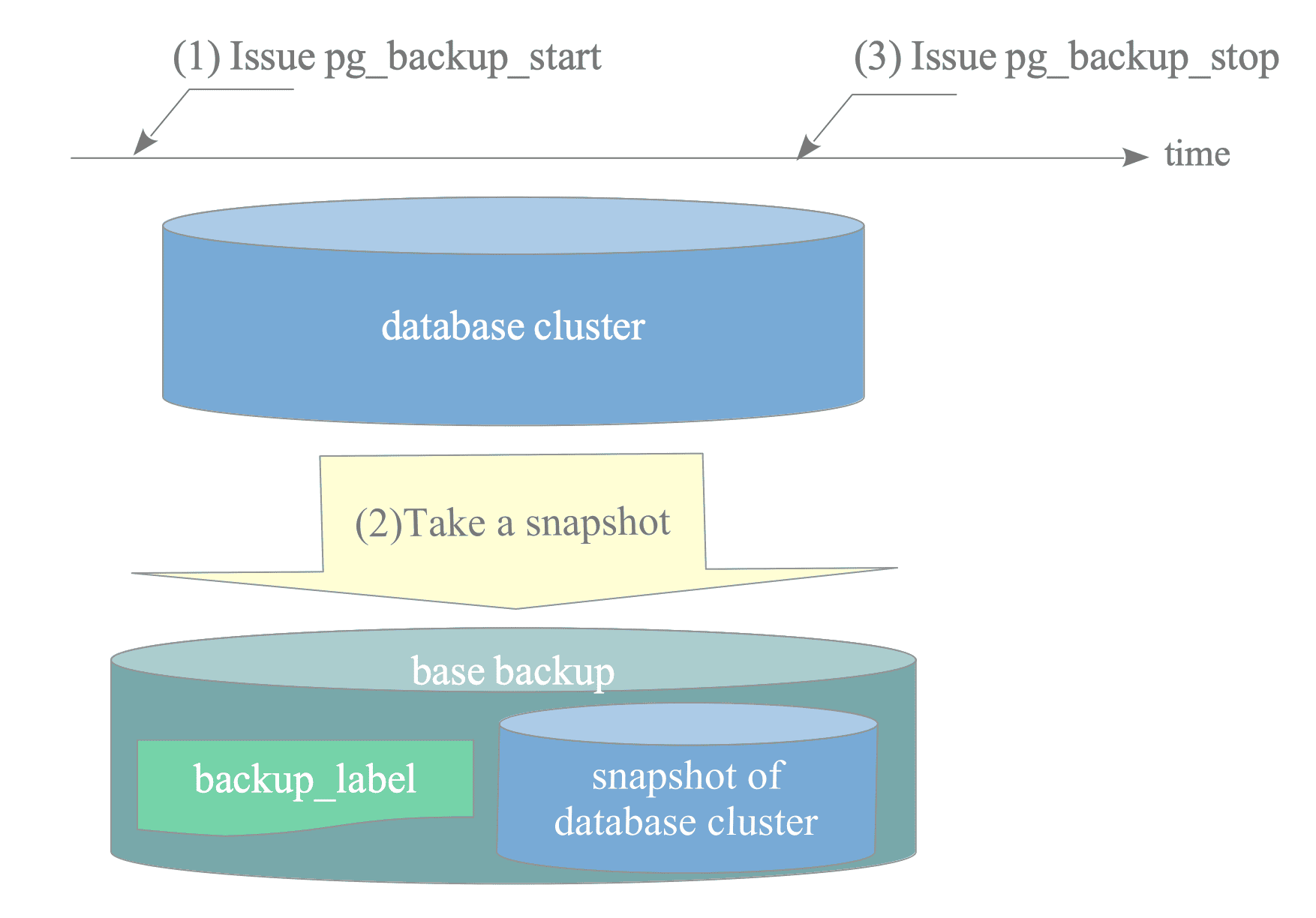
Figure 10.1. Making a base backup.
This procedure requires no table locks, so users continue issuing queries without interruption. This provides a significant advantage over other major open-source RDBMSs.
The pg_basebackup utility internally invokes these commands and inherits their advantages.
The pg_backup_start and pg_backup_stop commands are defined in xlogfuncs.c.
Until version 14, the pg_backup_start command and the pg_backup_stop command were named pg_start_backup and pg_stop_backup, respectively.
10.1.1. pg_backup_start
The pg_backup_start command prepares for a base backup by internally invoking the do_pg_backup_start() function.
As discussed in Section 9.8, recovery starts from a REDO point. Therefore, pg_backup_start performs a checkpoint to explicitly create a REDO point at the start of the backup. Because regular checkpoints may occur multiple times during a backup, the system must save this specific checkpoint location in a file other than pg_control.
Specifically, pg_backup_start performs four operations:
- Force the database into full-page write mode.
- Switch to a new WAL segment file (versions 8.4 or later).
- Execute a checkpoint.
- Create a backup_label file — This file, located in the top level of the base directory, contains essential information about the backup, including the checkpoint location.
The third and fourth operations represent the core of this command. The first and second operations ensure more reliable database cluster recovery.
10.1.1.1. backup_label file
A backup_label file contains the following items (seven items in version 11 or later):
- CHECKPOINT LOCATION: The LSN location of the checkpoint record created by this command.
- START WAL LOCATION: Used primarily for streaming replication (Chapter 11). A standby server reads this value only once at initial startup.
- BACKUP METHOD: The method used to create the backup.
- BACKUP FROM: Indicates whether the backup came from a primary or standby server.
- START TIME: The timestamp when pg_backup_start was executed.
- LABEL: The label specified in the pg_backup_start command.
- START TIMELINE: The timeline at the start of the backup (introduced in version 11 for sanity checks).
An example of a backup_label file created by pg_basebackup:
$ cat $PGDATA/backup_label
START WAL LOCATION: 0/1B000028 (file 00000001000000000000001B)
CHECKPOINT LOCATION: 0/1B000060
BACKUP METHOD: streamed
BACKUP FROM: primary
START TIME: 2024-1-1 11:45:19 GMT
LABEL: pg_basebackup base backup
START TIMELINE: 1
During recovery, PostgreSQL retrieves the CHECKPOINT LOCATION from the backup_label file to read the checkpoint record from the appropriate archive log. It then identifies the REDO point and begins the recovery process.
The answer lies in the recovery process. This process restores the database cluster to a consistent state even if the files are physically inconsistent.
Standard tools may copy files at different times, which leads to internal inconsistencies. Despite this, the database cluster can still reach a consistent state by replaying the archived WAL files.
Therefore, file-system-level snapshots or specialized backup tools are not strictly required.
10.1.2. pg_backup_stop
The pg_backup_stop command completes the backup by internally invoking the do_pg_backup_stop() function.
It performs five operations:
- Reset the database to non-full-page writes mode if pg_backup_start changed it.
- Write a WAL record indicating the end of the backup.
- Switch the WAL segment file.
- Create a backup history file — This file includes the contents of the backup_label file and the completion timestamp.
- Delete the backup_label file — This file is necessary for recovery from the backup, but is no longer needed in the original database cluster after copying.
The backup history file follows this naming pattern:
- Backup History File Pattern::
{WAL_segment}.{offset}.backup- offset: The starting LSN/value of the base backup.
10.1.3. pg_basebackup
pg_basebackup is a utility for taking online backups.
Through version 16, it supported full backups of the entire database cluster. Version 17 added incremental backups, which are discussed in Section 10.5.
To perform remote backups, pg_basebackup utilizes the walsender process, a component of streaming replication explained in Chapter 11.
For example, to take a full backup from host 192.168.1.10 to the local directory /usr/local/pgsql/backup/full:
$ pg_basebackup -h 192.168.1.10 -p 5432 -D /usr/local/pgsql/backup/full -X stream -P -vFigure 10.2 illustrates the pg_basebackup sequence:
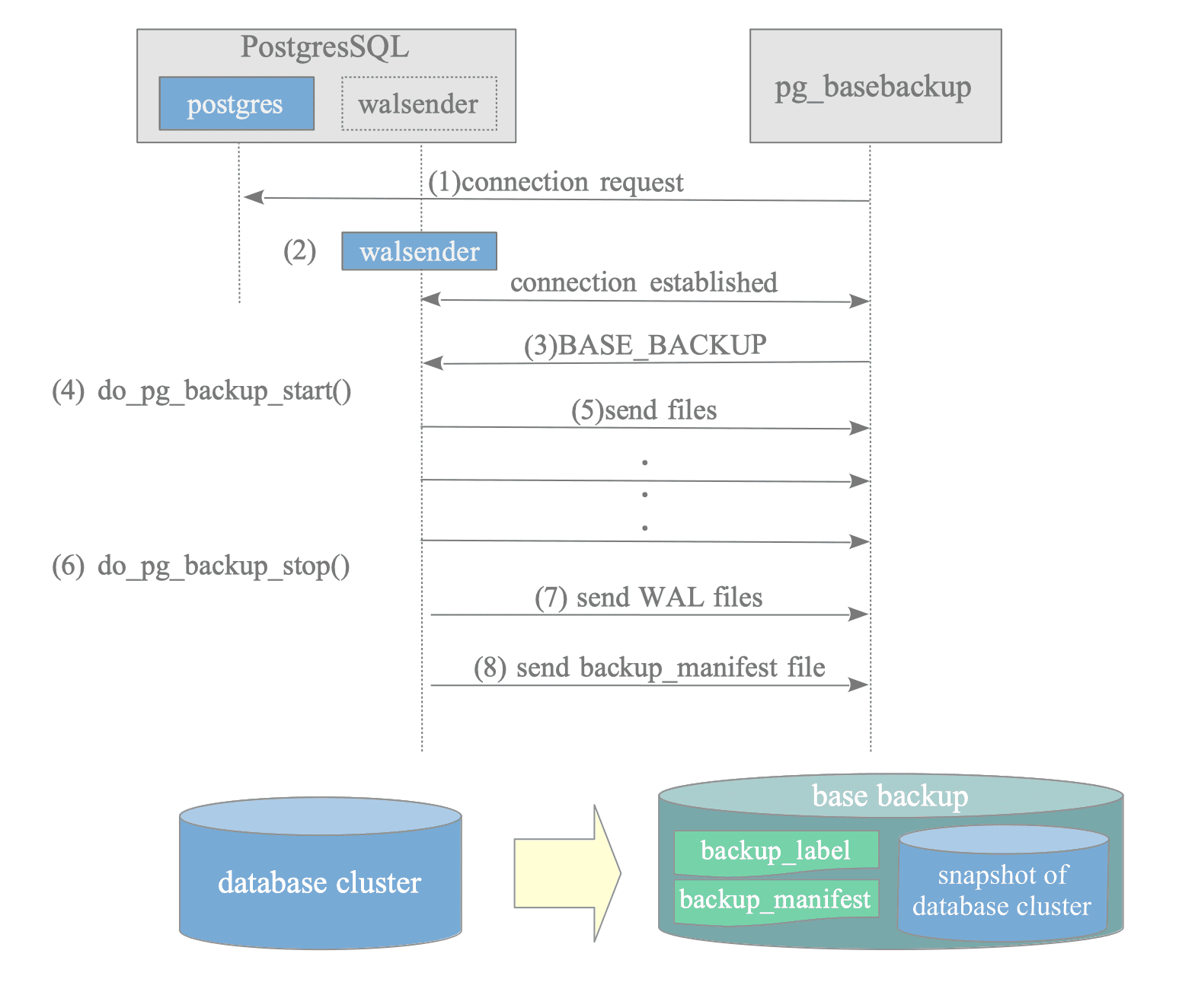
Figure 10.2. The sequence of how the pg_basebackup takes a full backup.
- Connection request: pg_basebackup requests a walsender connection from the PostgreSQL server.
- Create walsender process: The server creates a walsender process and establishes the connection.
- Base backup request: pg_basebackup requests the backup.
- Execute do_pg_backup_start(): The walsender process runs this function.
- Send all files: The walsender sends all database cluster files, excluding WAL files in pg_wal.
- Execute do_pg_backup_stop(): The walsender process runs this function.
- Send WAL files: The walsender sends WAL files in pg_wal if the ‘–wal-method’ option is not ’none’.
- Send backup_manifest file: The walsender creates and sends the manifest file.
Step 5 excludes WAL files to ensure the final segments are captured by pg_basebackup.
In step 6, do_pg_backup_stop() switches the current WAL segment, ensuring that all files generated during the backup are flushed to the pg_wal directory.
$ ls /usr/local/pgsql/backup/full
PG_VERSION        global        pg_ident.conf  pg_serial     pg_tblspc             postgresql.conf
backup_label      log           pg_logical     pg_snapshots  pg_twophase
backup_manifest   pg_commit_ts  pg_multixact   pg_stat       pg_wal
base              pg_dynshmem   pg_notify      pg_stat_tmp   pg_xact
current_logfiles pg_hba.conf pg_replslot pg_subtrans postgresql.auto.confWalsender handles replication, as explained in Chapter 11.
While pg_basebackup is not directly replication, postgres and walsender were the only processes available for external program connections during its development. Consequently, the walsender protocol was extended for pg_basebackup.
10.1.3.1. Backup Manifest Files
A backup manifest file is a JSON file containing metadata and verification information.
Table 10.1 shows Key Components.
| Key | Values |
|---|---|
| PostgreSQL-Backup-Manifest-Version | Backup manifest version number. |
| Files | List of objects that contains all file’s path, size, checksum, etc. |
| WAL-Ranges | Timeline and the LSN range during the backup procedure: Start-LSN: The LSN of the REDO point generated by CHECKPOINT when the do_pg_backup_start() function is invoked. End-LSN: The LSN of the WAL log created by the do_pg_backup_stop() function. |
| Manifest-Checksum | The checksum value of this manifest file. |
Here’s a cited example of a backup manifest file:
$ cat /usr/local/pgsql/backup/full/backup_manifest
{ "PostgreSQL-Backup-Manifest-Version": 2,
"System-Identifier": 7426689740139212305,
"Files": [
{ "Path": "backup_label", "Size": 225, "Last-Modified": "2024-10-17 10:41:48 GMT", "Checksum-Algorithm": "CRC32C", "Checksum": "1950abcb" },
{ "Path": "postgresql.conf", "Size": 30771, "Last-Modified": "2024-10-17 10:29:00 GMT", "Checksum-Algorithm": "CRC32C", "Checksum": "a9c769e0" },
{ "Path": "postgresql.auto.conf", "Size": 88, "Last-Modified": "2024-10-17 10:29:12 GMT", "Checksum-Algorithm": "CRC32C", "Checksum": "536f950b" },
{ "Path": "pg_ident.conf", "Size": 2640, "Last-Modified": "2024-10-17 10:29:12 GMT", "Checksum-Algorithm": "CRC32C", "Checksum": "0ce04d87" },
{ "Path": "pg_xact/0000", "Size": 8192, "Last-Modified": "2024-10-17 10:41:48 GMT", "Checksum-Algorithm": "CRC32C", "Checksum": "4c2ce5fc" },
{ "Path": "pg_hba.conf", "Size": 5711, "Last-Modified": "2024-10-17 10:29:12 GMT", "Checksum-Algorithm": "CRC32C", "Checksum": "d62da38c" },
{ "Path": "PG_VERSION", "Size": 3, "Last-Modified": "2024-10-17 10:29:12 GMT", "Checksum-Algorithm": "CRC32C", "Checksum": "64440205" },
{ "Path": "base/4/113", "Size": 8192, "Last-Modified": "2024-10-17 10:29:12 GMT", "Checksum-Algorithm": "CRC32C", "Checksum": "d1bc40bb" },
{ "Path": "base/4/1417", "Size": 0, "Last-Modified": "2024-10-17 10:29:12 GMT", "Checksum-Algorithm": "CRC32C", "Checksum": "00000000" },
{ "Path": "base/4/2610_fsm", "Size": 24576, "Last-Modified": "2024-10-17 10:29:12 GMT", "Checksum-Algorithm": "CRC32C", "Checksum": "b9b5f34f" },
{ "Path": "base/4/3542", "Size": 16384, "Last-Modified": "2024-10-17 10:29:12 GMT", "Checksum-Algorithm": "CRC32C", "Checksum": "e7f849bf" },

... snip ...

{ "Path": "global/pg_control", "Size": 8192, "Last-Modified": "2024-10-17 10:41:48 GMT", "Checksum-Algorithm": "CRC32C", "Checksum": "43872087" }
],
"WAL-Ranges": [
{ "Timeline": 1, "Start-LSN": "0/4000028", "End-LSN": "0/4000120" }
],
"Manifest-Checksum": "4c6d8a85379990904f6986f5bfd98db9f4640cfc96f440f8674abe6251cfffb8"}