12.6. Transaction Reassembly and Sending Message
Beta Version: Work in progress.
This section describes how the ReorderBuffer reassembles accumulated changes and sends them to the subscriber’s apply worker via an output plugin.
12.6.1. Outline of Transaction Reassembly
When the walsender detects a COMMIT record in the WAL, the ReorderBuffer initiates the reassembly process.
It organizes captured changes in LSN order and passes them to the output plugin.
After the plugin processes the transaction, the ReorderBuffer releases memory by deleting the change records and the ReorderBufferTXN entry.
The standard processing flow is as follows:
- Retrieve Transaction Data: The ReorderBufferTXN for the committed transaction is retrieved.
- Merge Subtransactions: If subtransactions exist, their change lists merge into the top-level transaction and are ordered by LSN.
- Ensure Consistency: The final list of change records is sorted by LSN to ensure chronological consistency.
- Origin Check: As detailed in Section 12.1.4, origin information resides within COMMIT or ABORT records. If present, the ReorderBuffer includes this information in the replication message; otherwise, it is omitted.
- Pass to Plugin: Changes are iterated and passed sequentially to the output plugin (e.g., pgoutput).
- Cleanup: The ReorderBufferTXN and all internal ReorderBufferChange objects are released to free memory.
While subtransactions must be merged in practice, this section assumes transactions without subtransactions for simplicity.
In such cases, ReorderBufferChange records are naturally ordered within their list, allowing the plugin to process them by simply traversing the list in ascending order.
If a transaction is ABORTED, the ReorderBuffer immediately discards the corresponding ReorderBufferTXN and all associated changes without passing them to the plugin.
12.6.1.1. Examples
Figures 12.24 and 12.25, along with the following byte sequences, represent messages generated by pgoutput during typical transactions involving multiple tables and actions.
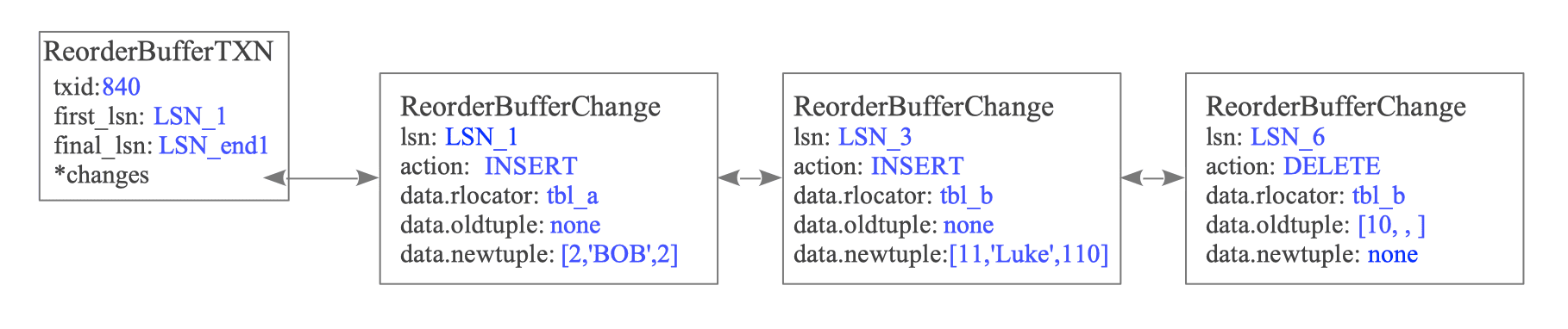
Figure 12.24. Structure of ReorderBufferTXN and changes for txid 840.
Generated Message Sequence for txid 840:
[B] lsn=0/1CAA128  ts=2026-03-28T16:55:00  txid=840
[R] oid=16456  "public"."tbl_a"  'd'  3cols      [id:int4(key)][name:text][data:int4]
[I] oid=16456  N      [t"2"][t"Bob"][t"2"]
[R] oid=16464  "public"."tbl_b"  'd'  3cols      [id:int4(key)][name:text][data:int4]
[I] oid=16464  N      [t"11"][t"Luke"][t"110"]
[D] oid=16464  K      [t"10"][u][u]
[C] flags=0  commit=0/1CAA128  end=0/1CAA200  ts=2026-03-28T16:55:10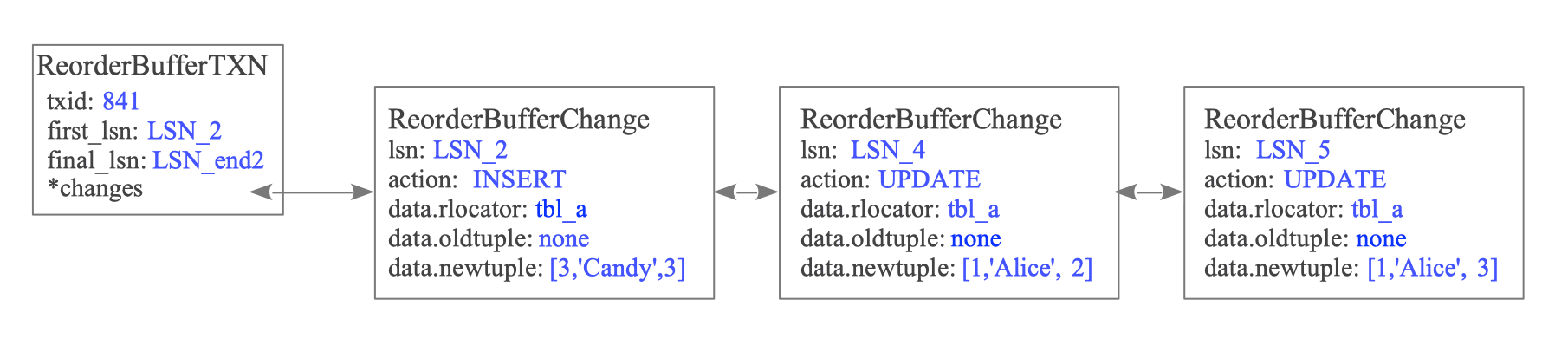
Figure 12.25. Structure of ReorderBufferTXN and changes for txid 841.
Generated Message Sequence for txid 841:
[B] lsn=0/1CA9E00  ts=2026-03-28T16:55:05  txid=841
[R] oid=16456  "public"."tbl_a"  'd'  3cols      [id:int4(key)][name:text][data:int4]
[I] oid=16456  N      [t"3"][t"Candy"][t"3"]
[U] oid=16456  N      [t"1"][t"Alice"][t"2"]
[U] oid=16456  N      [t"1"][t"Alice"][t"3"]
[C] flags=0  commit=0/1CA9E00  end=0/1CA9F00  ts=2026-03-28T16:55:15
Note on Relation (‘R’) Messages: The Relation message is sent only if the specific table’s metadata has not been sent during the current walsender session, or if the table definition has changed. This minimizes redundant metadata transfer.
12.6.2. Sending Messages
Once serialized by the output plugin, these messages are encapsulated into the logical replication protocol and sent over the network. See Figure 12.26.
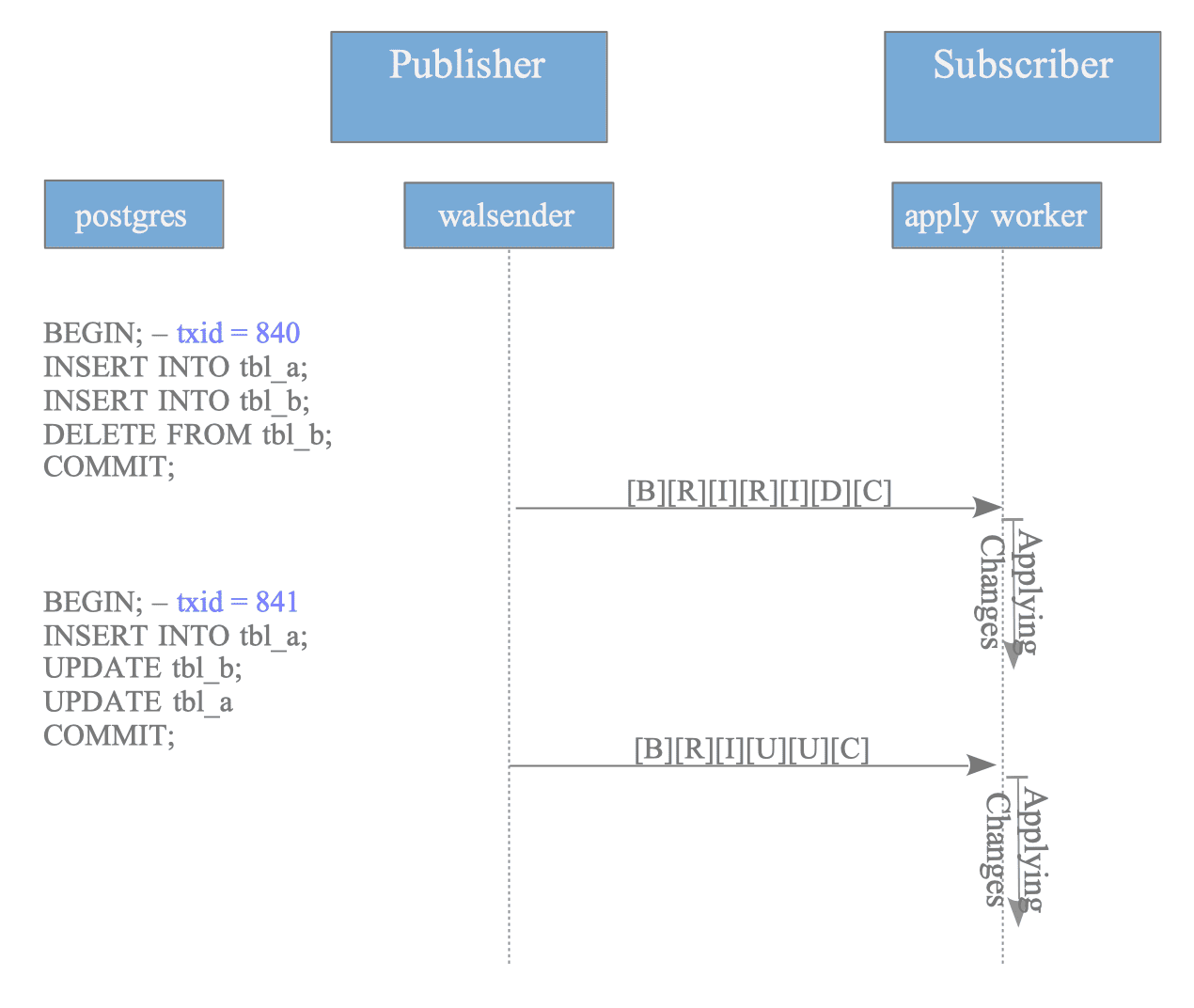
Figure 12.26. Message sequence for standard (non-streamed) transactions.
In a standard (non-streamed) transaction, the subscriber’s apply worker receives the entire sequence, from Begin to Commit, as a single continuous stream only after the publisher commits the transaction.
Logical replication messages use a binary format and cannot be displayed directly as plain text.
However, the raw binary stream can be inspected by piping the output of the pg_recvlogical utility into the od (octal dump) command.
$ # Create a slot using the pgoutput plugin
$ pg_recvlogical -d testdb --slot myslot --create-slot  -P pgoutput

$ # Start the slot and pipe the binary stream to od for inspection
$ pg_recvlogical -d testdb --slot=myslot --start -f -  -o proto_version=1  -o publication_names='my_publication' |  od -c  -A n
   B  \0  \0  \0  \0 001 276 203 270  \0 002 364 005 301   < 232
 350  \0  \0 003  \b  \n   R  \0  \0   @ 033   p   u   b   l   i
   c  \0   t   b   l   _   1  \0   d  \0 003 001   i   d  \0  \0
  \0  \0 027 377 377 377 377  \0   n   a   m   e  \0  \0  \0  \0
 031 377 377 377 377  \0   d   a   t   a  \0  \0  \0  \0 027 377
 377 377 377  \n   I  \0  \0   @ 033   N  \0 003   t  \0  \0  \0
 001   1   t  \0  \0  \0 005   A   l   i   c   e   t  \0  \0  \0
 001   1  \n   I  \0  \0   @ 033   N  \0 003   t  \0  \0  \0 001
   2   t  \0  \0  \0 003   B   o   b   t  \0  \0  \0 001   2  \n
   U  \0  \0   @ 033   N  \0 003   t  \0  \0  \0 001   1   t  \0
  \0  \0 005   A   l   i   c   e   t  \0  \0  \0 002   1   0  \n
   C  \0  \0  \0  \0  \0 001 276 203 270  \0  \0  \0  \0 001 276
... snip ...
For debugging or research, the test_decoding plugin is a suitable alternative, as it decodes the WAL into a human-readable format.
$ # Create a slot using the test_decoding plugin
$ pg_recvlogical -d testdb --slot myslot --create-slot  -P test_decoding

$ # View the decoded output
$ pg_recvlogical -d testdb --slot=myslot --start -f -

BEGIN 840
table public.tbl_a: INSERT: id[integer]:2 name[text]:'Bob' data[integer]:2
table public.tbl_b: INSERT: id[integer]:11 name[text]:'Luke' data[integer]:110
table public.tbl_b: DELETE: id[integer]:10
COMMIT 840
BEGIN 841
table public.tbl_a: INSERT: id[integer]:3 name[text]:'Candy' data[integer]:3
table public.tbl_a: UPDATE: id[integer]:1 name[text]:'Alice' data[integer]:2
table public.tbl_a: UPDATE: id[integer]:1 name[text]:'Alice' data[integer]:3
COMMIT 841
12.6.3. Streaming of Large Transactions
When streaming is set to ‘on’ or ‘parallel’ and the ReorderBuffer reaches its memory limit, PostgreSQL does not write changes to local spill files. Instead, the publisher sends these changes immediately to the subscriber — specifically to the apply worker or leader apply worker.
The following example illustrates how a large transaction is segmented. See Figure 12.27.
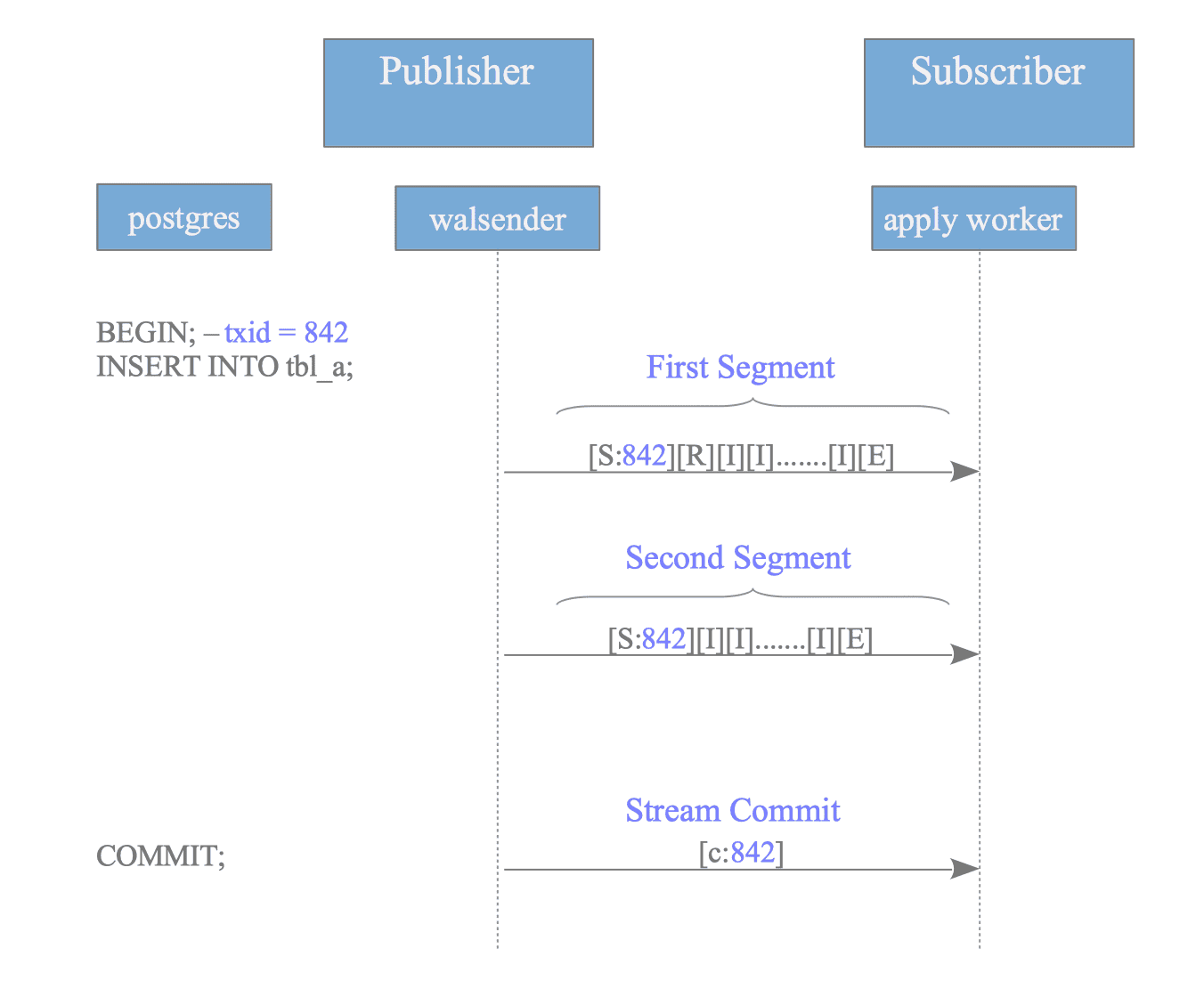
Figure 12.27. Message sequence for streamed transactions.
If txid 842 consumes the most memory when the buffer overflows, the publisher reorders its changes and wraps them between Stream Start (‘S’) and Stream Stop (‘E’) markers to form a segment.
Notably, the Stream Start message replaces the Begin (‘B’) message for the initial segment of a streamed transaction.
12.6.3.1. First Segment (txid=842)
[S] txid=842  first_segment=1
[R] oid=16456  "public"."tbl_a"  'd'  3cols  [id:int4(key)][name:text][data:int4]
[I] txid=842  oid=16456  N  [t"1"][t"Data1"][t"100"]
[I] txid=842  oid=16456  N  [t"2"][t"Data2"][t"200"]
... (thousands of INSERTs) ...
[I] txid=842  oid=16456  N  [t"50000"][t"Data50000"][t"5000000"]
[E]
Subsequent overflows trigger additional segments. Since these are not the initial transmission for this transaction, the first_segment flag in the Stream Start command is set to 0.
12.6.3.2. Second Segment (txid=842)
[S] txid=842  first_segment=0
[I] txid=842  oid=16456  N  [t"50001"][t"Data50001"][t"5000100"]
... (further INSERTs) ...
[I] txid=842  oid=16456  N  [t"100000"][t"Data100000"][t"10000000"]
[E]
When txid 842 eventually commits on the publisher, the publisher sends a Stream Commit (‘c’) message.
12.6.3.3. Stream Commit
[c] txid=842 flags=0 commit=0/1CB0000 end=0/1CB0100 ts=2026-03-28T17:10:00If the transaction aborts instead, the publisher sends a Stream Abort (‘A’) message to inform the subscriber to discard the previously received segments.