12.4. WAL Data Filtering and Buffering
Beta Version: Work in progress.
This section describes the data filtering and buffering mechanism within the ReorderBuffer.
The discussion begins with the multi-stage filtering process executed by the walsender, which determines which records are eligible for decoding. This is followed by a demonstration of how the ReorderBuffer accumulates these changes through a concrete transaction scenario.
Furthermore, this section explains the differences in WAL data storage for UPDATE and DELETE statements based on the Replica Identity.
Finally, the section provides an overview of the “Spill to Disk” mechanism, which is triggered when the ReorderBuffer exceeds its memory limit.
12.4.1. Filtering
The walsender decides whether to decode a WAL record and register it in the ReorderBuffer’s changes list through a multi-stage filtering gate.
-
1st Gate (Database OID):
The walsender immediately discards WAL records belonging to databases other than the target database. -
2nd Gate (Origin ID / Callback):
Since version 16, the walsender checks the origin before data enters the ReorderBuffer.If origin = “none” is configured, the walsender discards any change originating from another node (origin_id > 0) at this stage.
This prevents infinite replication loops. Refer to Section 12.1.4.1 for details.
-
3rd Gate (Publication Cache):
Since version 15, the walsender performs table-level filtering before buffering. It skips changes to tables not included in a publication and rows excluded by row filters without accumulating them in the buffer. -
4th Gate (Relation Type / Physical Structure):
The walsender also filters out WAL records related to index updates.Logical replication focuses on row-level data changes; once the apply worker updates a tuple on the subscriber, the subscriber’s own indexing mechanism automatically handles the associated index updates.
Only changes that successfully pass through all these gates are stored in the ReorderBuffer.
Prior to version 15, the process operated as follows:
- Check the database OID of the WAL record (version 10 or later).
- Decode the WAL record and accumulate all resulting changes in the ReorderBuffer.
- Filter changes against the publication definitions only at the time of COMMIT.
In these versions, the walsender evaluated table-level filtering lazily. Consequently, the ReorderBuffer consumed memory unnecessarily by accumulating changes that were eventually discarded at commit time.
12.4.2. WAL Data Buffering
To understand how the walsender reconstructs logical changes from raw WAL data, this section examines the buffering process through a practical transaction interleaving scenario.
12.4.1.1. Setup: Target Relations
The scenario utilizes two tables, tbl_a and tbl_b. Both use a Primary Key as the default REPLICA IDENTITY.
CREATE TABLE tbl_a (id int PRIMARY KEY, name text, data int);
CREATE TABLE tbl_b (id int PRIMARY KEY, name text, data int);

INSERT INTO tbl_a VALUES (1, 'Alice', 100);
INSERT INTO tbl_b VALUES (10, 'Ken', 100);
12.4.1.2. Scenario: Interleaved Transaction Processing
The timeline below illustrates WAL record generation by two concurrent transactions (txid 840 and txid 841) and the process by which the ReorderBuffer captures these changes.
T0: BEGIN; -- txid 840
T1: INSERT INTO tbl_a VALUES(2,'Bob',200);
T2:
T3: INSERT INTO tbl_b VALUES(11,'Luke',110);
T4:
T5:
T6: DELETE FROM tbl_b WHERE id=10;
T7: COMMIT;
T8:
T0: BEGIN; -- txid 841
T1:
T2: INSERT INTO tbl_a VALUES(3,'Candy',3);
T3:
T4: UPDATE tbl_a SET data=data+1 WHERE id=1;
T5: UPDATE tbl_a SET data=data+1 WHERE id=1;
T6:
T7:
T8: COMMIT;Sequence of Operations:
- T0: Both txid 840 and txid 841 start.
- T1: txid 840 inserts a row into tbl_a.
- T2: txid 841 inserts a row into tbl_a.
- T3: txid 840 inserts a row into tbl_b.
- T4: txid 841 updates tbl_a.
- T5: txid 841 updates tbl_a again.
- T6: txid 840 deletes a row from tbl_b.
- T7: txid 840 commits. This triggers the ReorderBuffer to finalize and process the accumulated changes for this transaction.
- T8: txid 841 commits, and its changes are subsequently processed.
To understand why transaction isolation levels do not affect logical decoding, it is essential to consider when and how these mechanisms operate.
Logical decoding reconstructs committed change logs (WAL) that have already been finalized and applied to tuples. By the time these changes reach the WAL, they have already cleared all visibility checks mandated by their respective isolation levels during execution. Concurrency control governs tuple visibility while a transaction is running; in contrast, the decoding process focuses solely on reassembling the historical results of completed transactions.
Consequently, the original isolation level of a transaction has no bearing on the decoding logic itself.
The following explains how the ReorderBuffer captures WAL data at each step.
12.4.1.3. Detailed State Changes
T1: INSERT on tbl_a by txid 840
txid 840 creates a new ReorderBufferTXN struct. Its first_lsn field is set to the LSN of the WAL data written by this INSERT, and the change record is added to the changes list (see Figure 12.12).
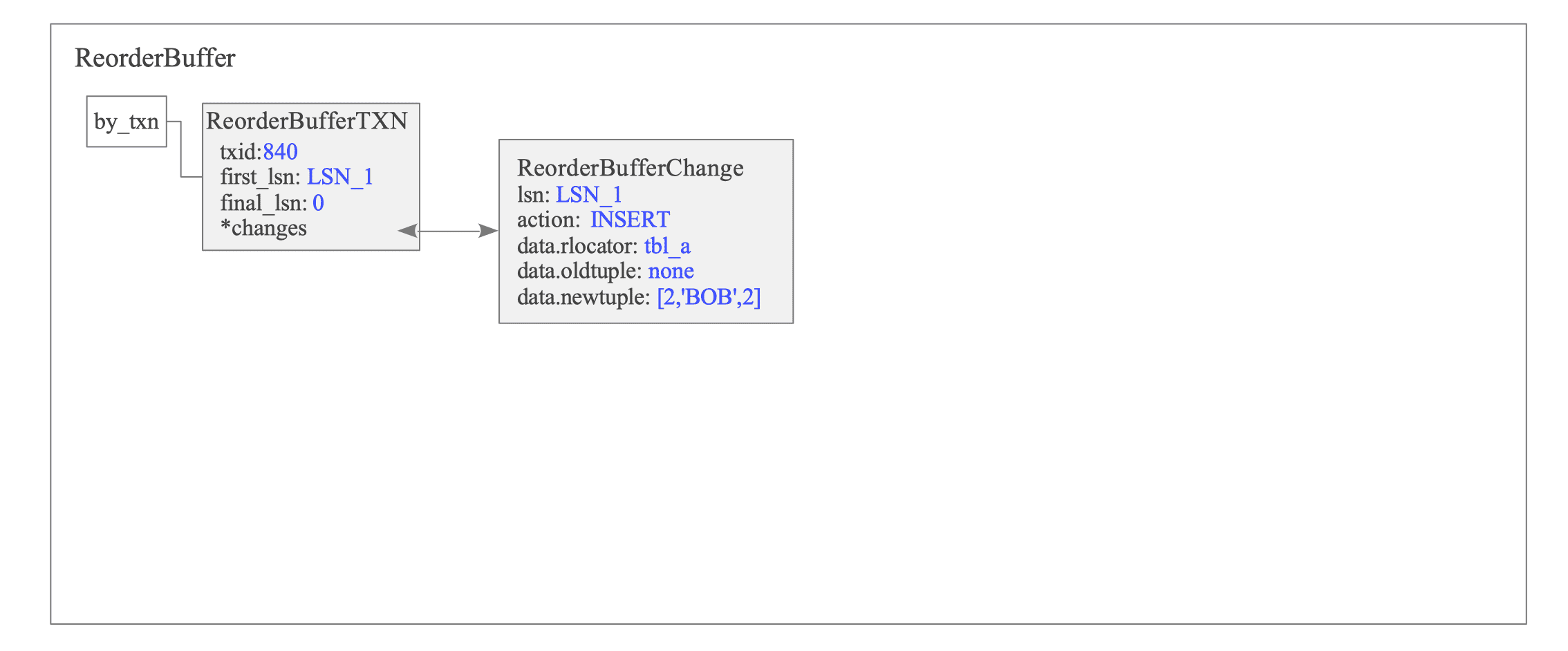
Figure 12.12. State of the ReorderBuffer after T1.
The ReorderBufferChange structure represents individual changes. It encapsulates essential metadata, including the LSN, the action type (e.g., INSERT), and the target relation OIDs (tablespace, database, and relation). The structure also stores the actual tuple data.
As mentioned in Section 9.4.3.1, when wal_level is set to logical, the main data portion of a Full Page Write (FPW) includes the actual modified tuple data.
This allows the walsender to bypass the page block during WAL retrieval. The walsender reads the tuple data directly from the main data section, reducing extraction overhead and optimizing decoding efficiency.
T2: INSERT on tbl_a by txid 841
txid 841 initializes a new ReorderBufferTXN structure (see Figure 12.13).
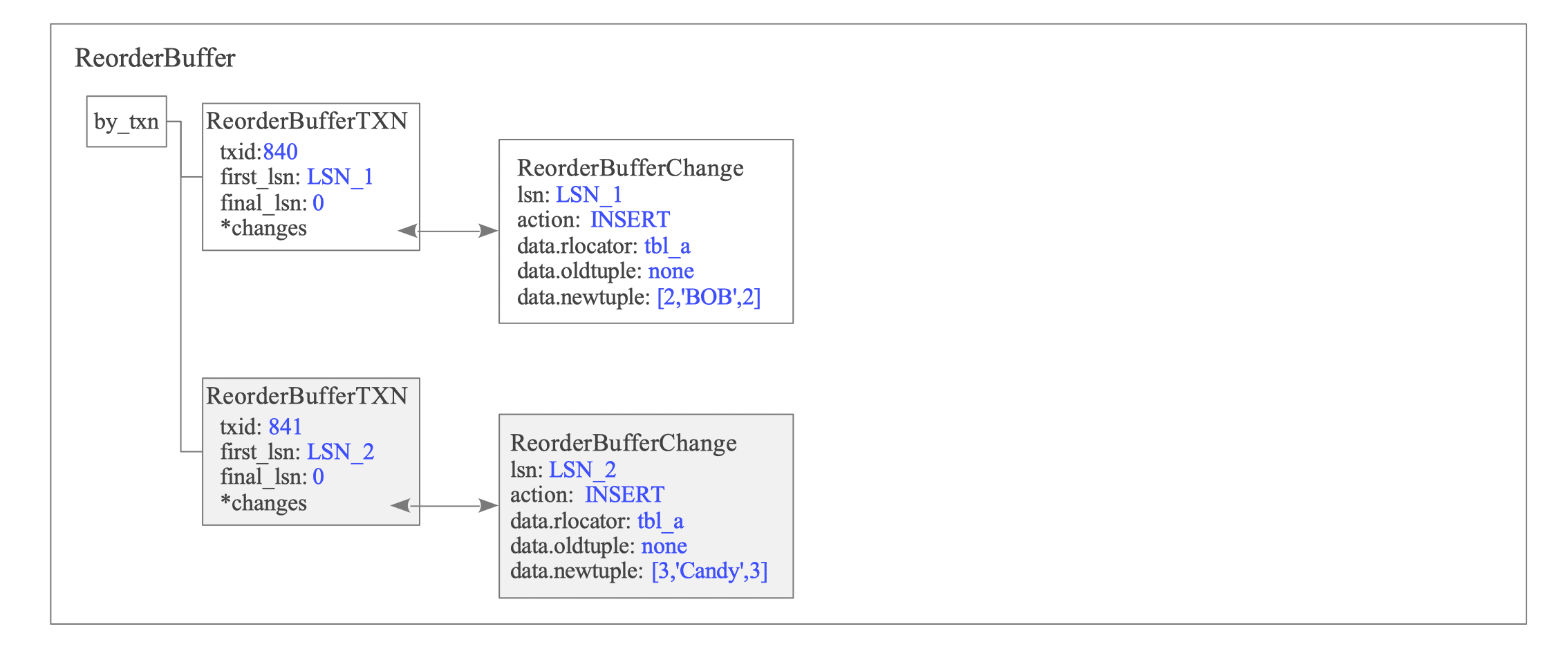
Figure 12.13. State of the ReorderBuffer after T2.
The ReorderBuffer accumulates changes for txid 840 and txid 841 in independent sub-lists to ensure transactional isolation within the buffer.
T3: INSERT on tbl_b by txid 840
The ReorderBuffer appends the WAL data from the INSERT operation of txid 840 to its specific changes list (see Figure 12.14).
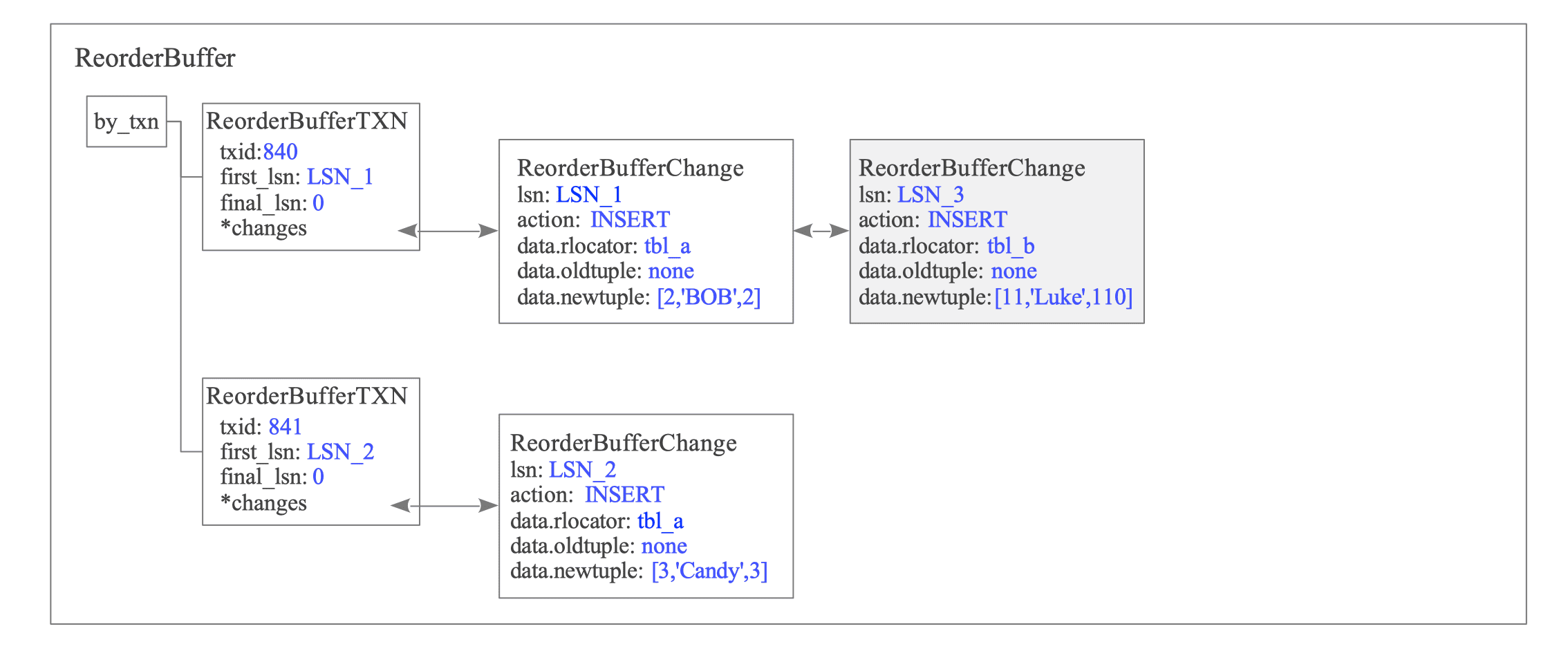
Figure 12.14. State of the ReorderBuffer after T3.
T4-T5: UPDATE on tbl_a by txid 841
txid 841 executes two sequential UPDATE statements on tbl_a.
The ReorderBuffer appends the WAL data for the first UPDATE to the changes list of txid 841 (see Figure 12.15).
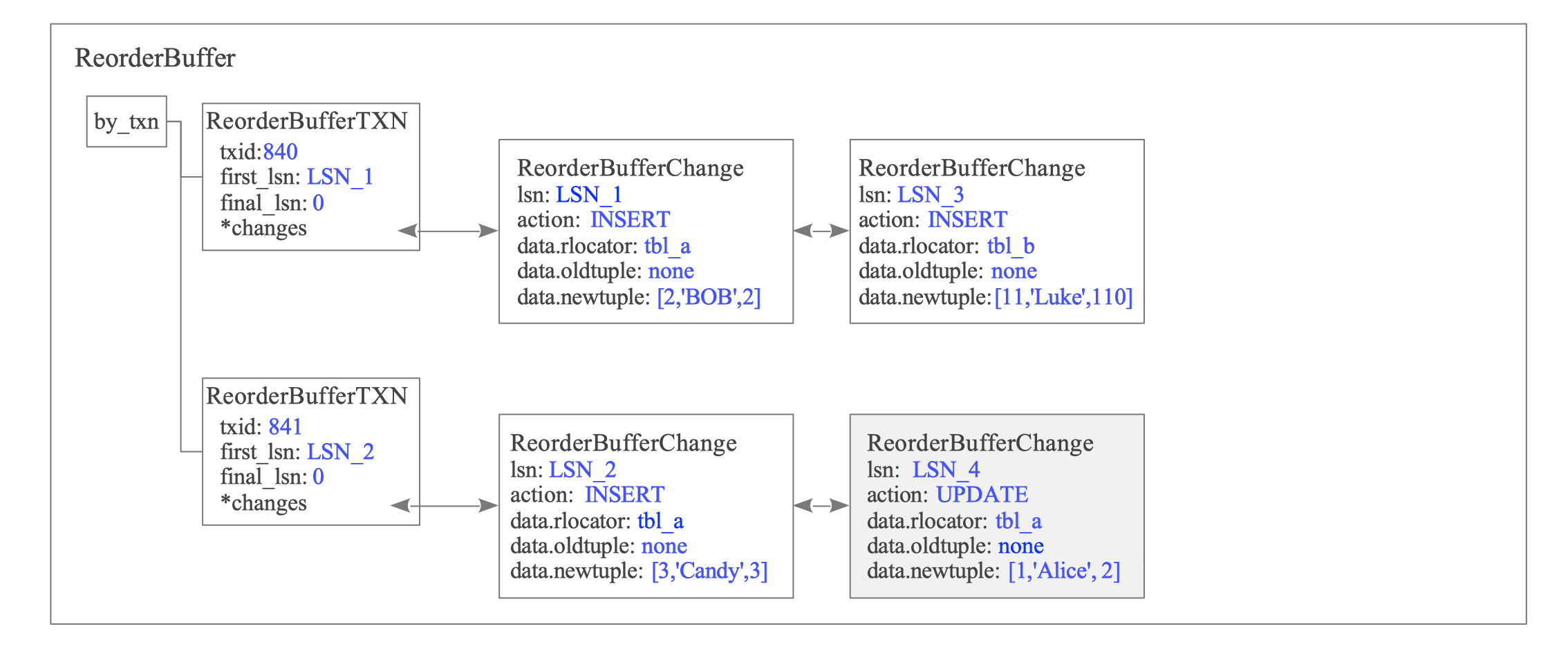
Figure 12.15. State of the ReorderBuffer after T4.
Under the REPLICA IDENTITY DEFAULT configuration, the WAL record includes the oldtuple only if the Primary Key columns are modified.
In this scenario, since the Primary Key (id) remains unchanged, the subscriber can uniquely identify the target tuple using the id = 1 provided in the newtuple. Consequently, the oldtuple is omitted because it is unnecessary for tuple identification.
Refer to Section 12.4.3 for more details.
Figure 12.16 illustrates the state after the second UPDATE statement updates the same tuple again.
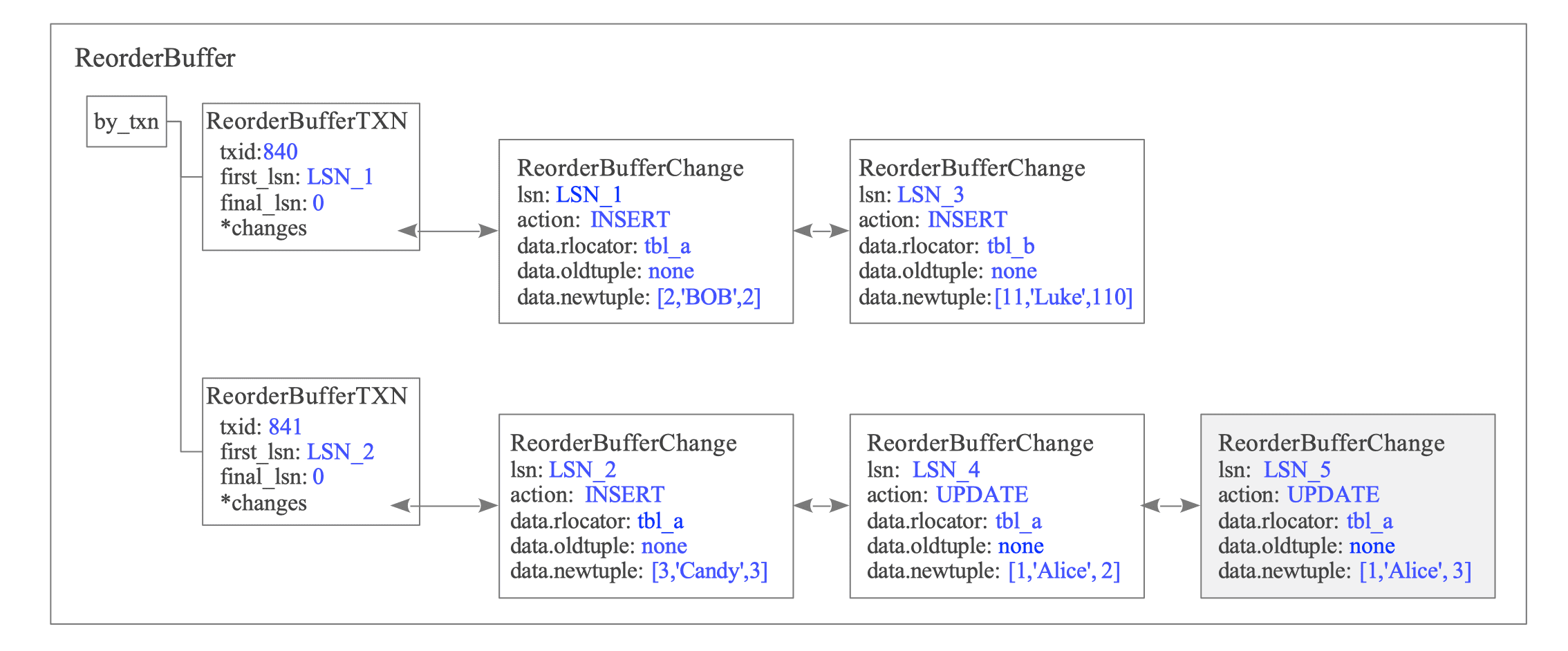
Figure 12.16. State of the ReorderBuffer after T5.
T6: DELETE on tbl_b by txid 840
When txid 840 deletes a row from tbl_b, the ReorderBuffer appends the change record to the changes list (see Figure 12.17).
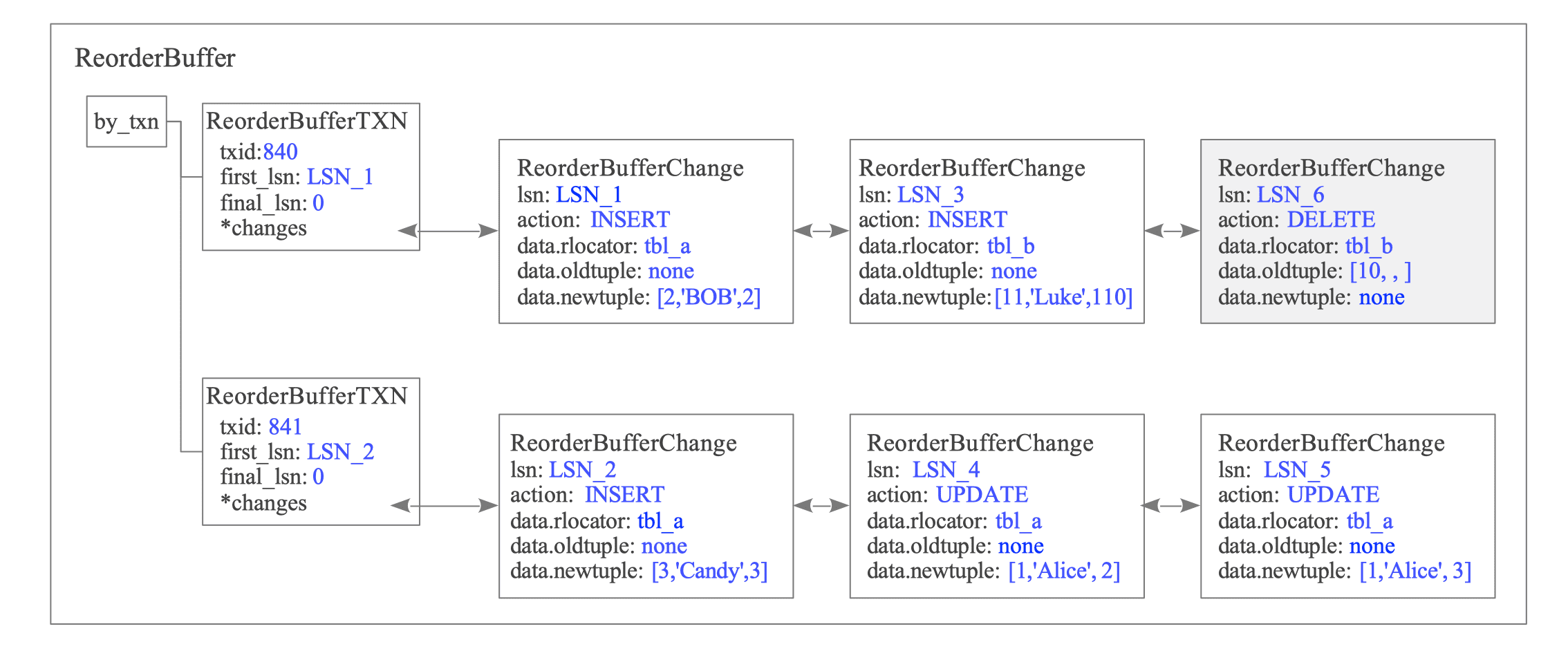
Figure 12.17. State of the ReorderBuffer after T6.
This record stores only the Primary Key data, which serves as the Replica Identity (see Figure 12.18).
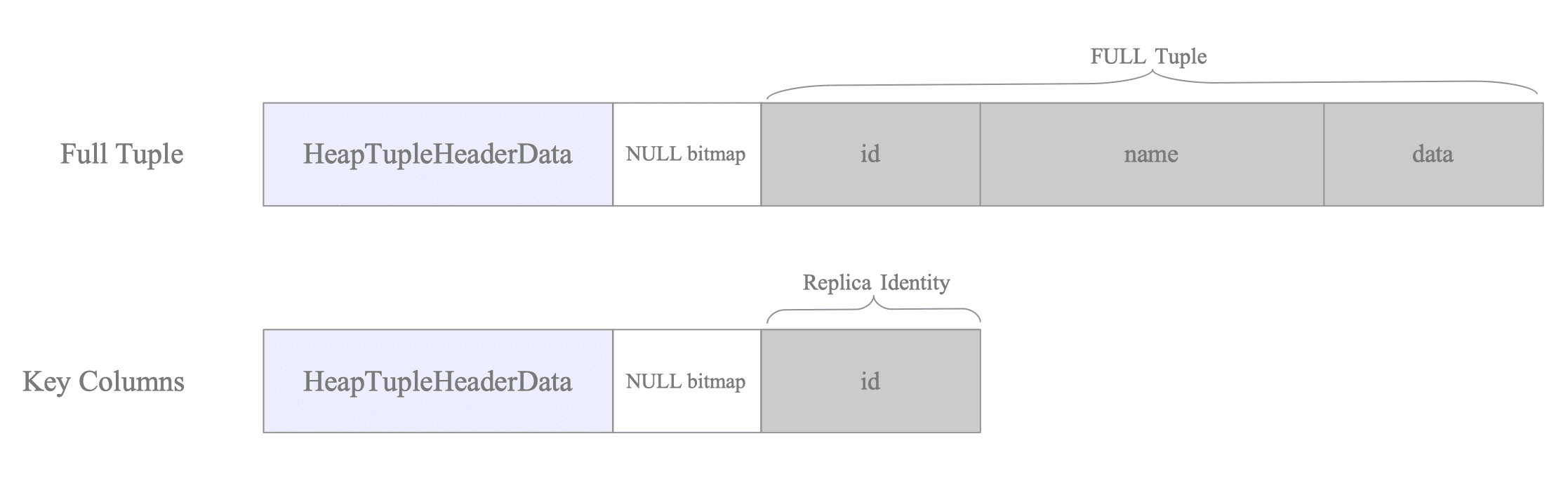
Figure 12.18. Details of the DELETE change record containing only Primary Key data.
A subscriber only requires Key information to identify and delete the target tuple. By omitting non-key columns (such as ’name’ and ‘data’), PostgreSQL minimizes memory consumption in the ReorderBuffer and reduces network bandwidth.
T7: COMMIT by txid 840
When txid 840 commits, the ReorderBuffer iterates through the changes list of the corresponding ReorderBufferTXN from the head. The Output Plugin receives each change, formats it into a replication message, and transmits it to the subscriber.
Section 12.6 describes change reordering and message transmission. After the data is sent, the ReorderBuffer removes the ReorderBufferTXN entry (see Figure 12.19).
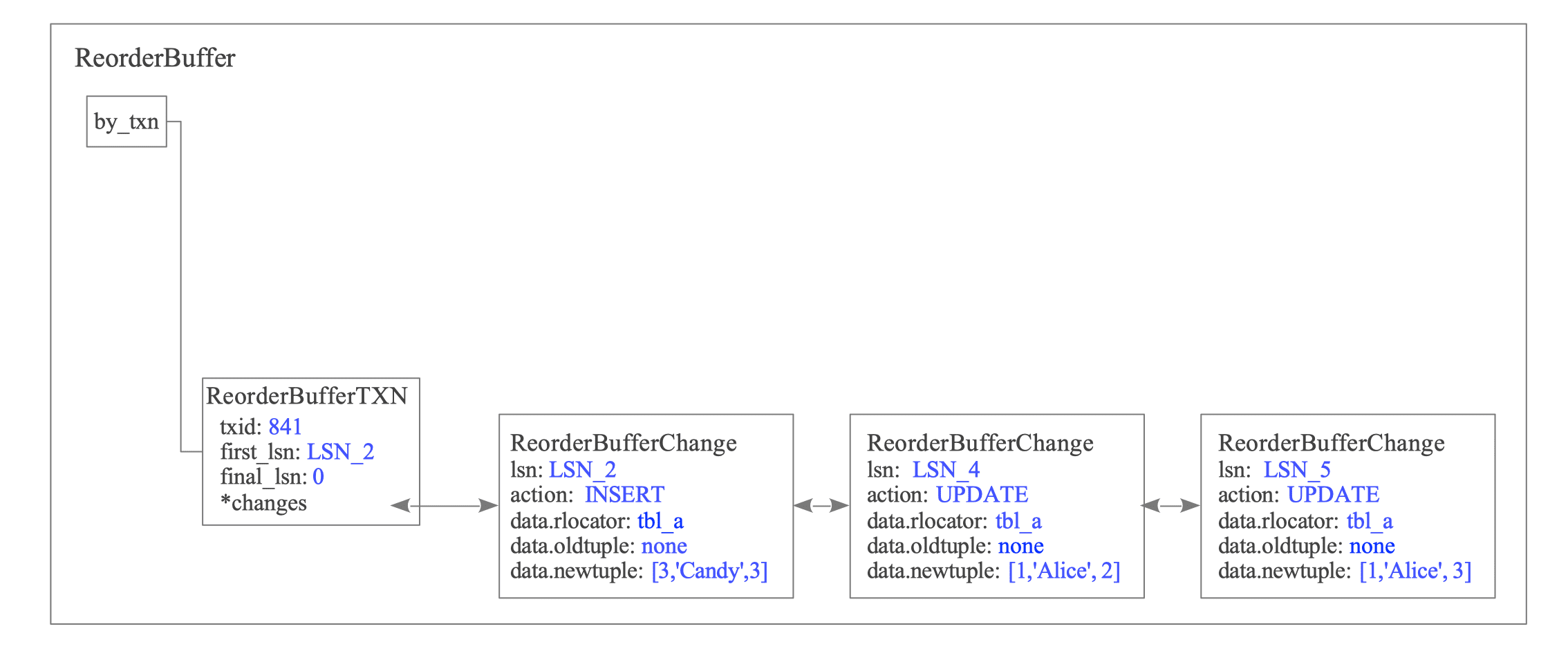
Figure 12.19. State of the ReorderBuffer after T7.
T8: COMMIT by txid 841
Similarly, when txid 841 commits, its accumulated changes are reconstructed and sent to the subscriber in the same manner.
12.4.3. Relation between Replica Identity and Decoded Tuples
The data recorded in the WAL for UPDATE and DELETE operations depends on the Replica Identity configured for the target table.
12.4.3.1. UPDATE Operations
The behavior of UPDATE operations differs depending on whether the Replica Identity is set to a specific key (Primary Key or Index) or to FULL.
First, consider the case where the Replica Identity is DEFAULT (PK) or USING INDEX:
The contents of oldtuple and newtuple vary based on which columns are modified:
| Replica Identity | Update Type | oldtuple | newtuple |
|---|---|---|---|
| PK / Index | Non-key columns | <none> | Full New Tuple |
| PK / Index | Key columns | Key Columns | Full New Tuple |
Whether PostgreSQL records an oldtuple depends on whether the updated columns are part of the Replica Identity. See Figure 12.20.
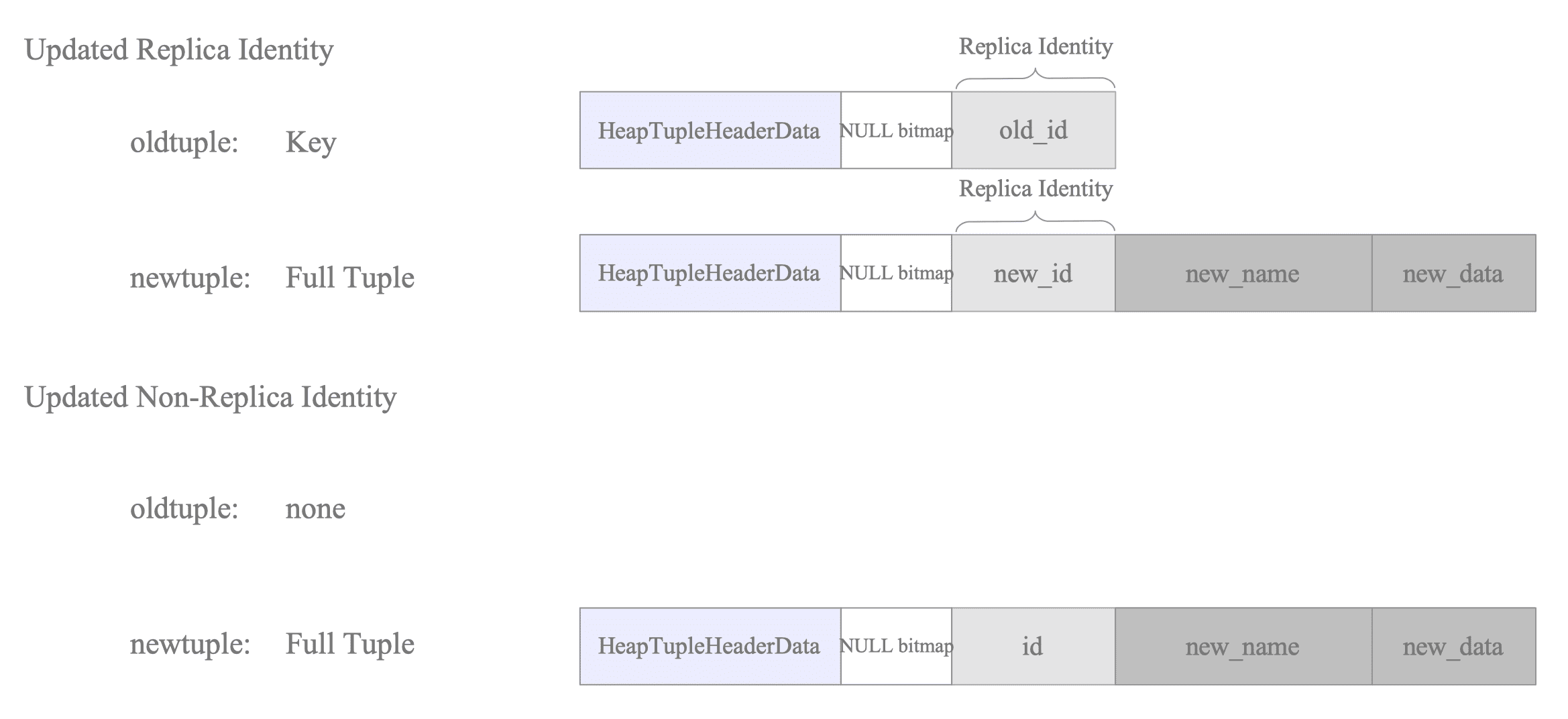
Figure 12.20. Payload structure for UPDATE operations under standard REPLICA IDENTITY.
When updating columns that constitute the Replica Identity, the oldtuple contains the previous key values. This allows the subscriber to identify the existing target tuple using these original values. The following pseudo-SQL illustrates this logic:
-- Pseudo-SQL: Identifying the tuple via the old key
UPDATE tbl_a SET id = id + 100 WHERE id = 1;
Conversely, if only non-identity columns are updated, the oldtuple remains empty (none). In this scenario, the subscriber identifies the target tuple using the key values already present in the newtuple.
-- Pseudo-SQL: Identifying the tuple via the current key
UPDATE tbl_a SET data = data + 100 WHERE id = 1;The Apply Worker does not assemble or execute text-based SQL queries. While it leverages the executor infrastructure, it bypasses the parsing and planning phases.
Instead, it performs direct tuple lookups — using index or sequential scans via functions such as RelationFindReplTupleByIndex — to identify and modify the target data.
When the Replica Identity is FULL, the oldtuple stores the entire tuple as it existed before the update, and the newtuple stores the entire updated tuple. See Figure 12.21.
| Replica Identity | Update Type | oldtuple | newtuple |
|---|---|---|---|
| FULL | Any columns | Full Old Tuple | Full New Tuple |

Figure 12.21. Payload structure for UPDATE operations under REPLICA IDENTITY FULL.
To uniquely identify the target tuple in a table without a formal key, the subscriber must match the values of all columns in its WHERE clause.
-- Pseudo-SQL: Full column matching required for identification
UPDATE tbl_a SET data = data + 100 WHERE id = 1 AND name = 'Alice' AND data = 100;
12.4.3.2. DELETE Operations
For DELETE operations, PostgreSQL records only the oldtuple, as no subsequent state exists:
| Replica Identity | oldtuple | newtuple |
|---|---|---|
| PK / Index | Key Columns | <none> |
| FULL | Full Old Tuple | <none> |
When using a PK or Index identity, the oldtuple preserves only the key, as this information is sufficient for the subscriber to locate and remove the target tuple.
In contrast, the FULL configuration requires the entire oldtuple to ensure the subscriber can accurately identify the specific tuple to be deleted. See Figure 12.22.
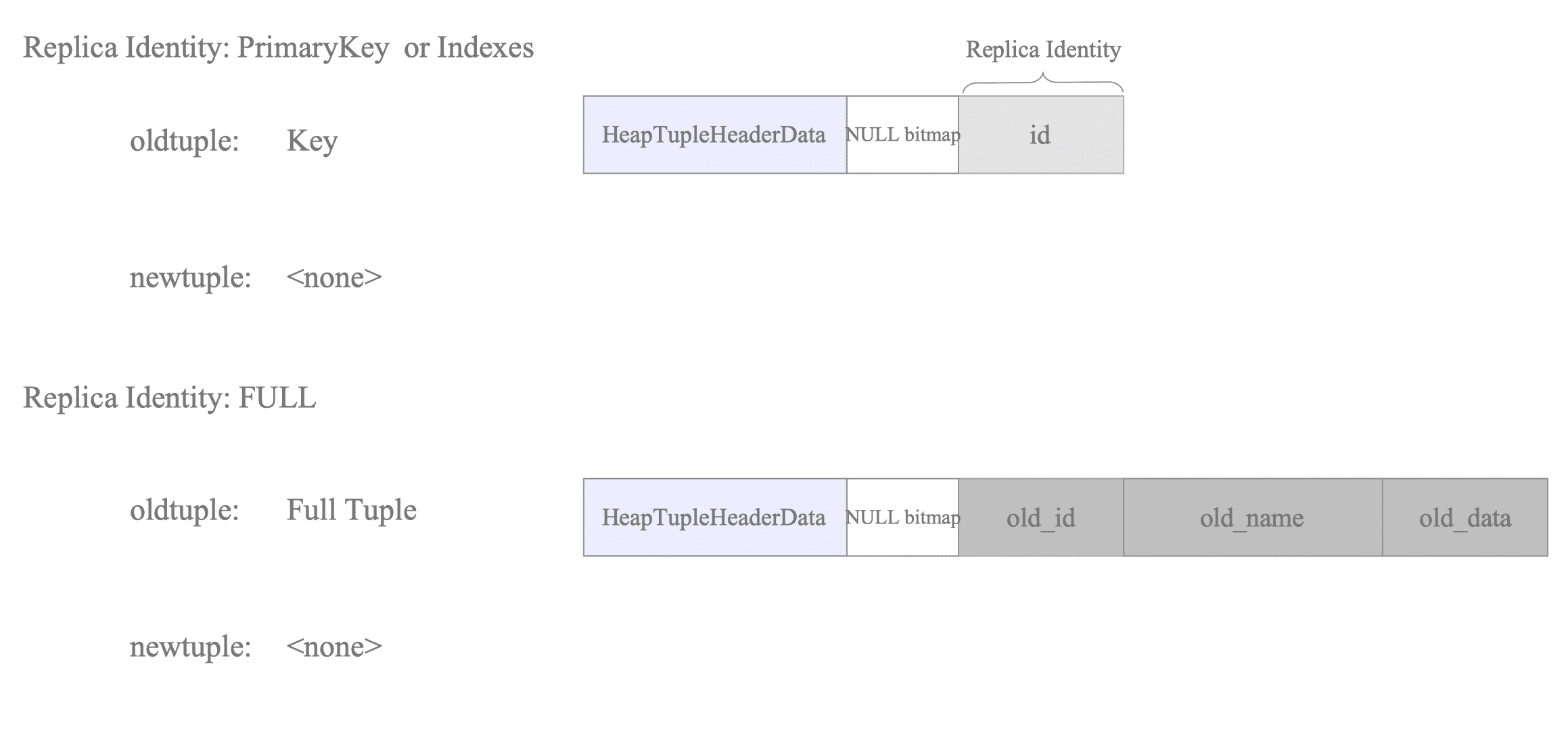
Figure 12.22. Identification of tuples for DELETE operations via oldtuple data.
12.4.4. ReorderBuffer Memory Management and Transaction Serialization (Spill-to-Disk)
To prevent memory exhaustion when processing large transactions, the ReorderBuffer implements a spill-to-disk mechanism. This process is triggered whenever the cumulative memory consumption of all buffered transactions exceeds the threshold defined by the logical_decoding_work_mem parameter.
12.4.4.1. The Spillover Algorithm
The following steps outline how the ReorderBuffer manages its memory footprint:
- Monitor Memory Usage: For every new WAL record appended to the ReorderBuffer, the total tracked memory size increases by the size of the newly added ReorderBufferChange record.
- Evaluate Threshold: The current memory size is compared against the logical_decoding_work_mem limit.
- Trigger Eviction (if threshold exceeded):
- Identify the Target: The system identifies the “heaviest” transaction — the one currently accumulating the largest number of buffered changes.
- Serialize Data: All buffered changes for that specific transaction are written into a
.spillfile within the$PGDATA/pg_replslot/<slot_name>directory. - Memory Reclamation: The memory allocated for the serialized changes is released, though the transaction’s metadata (the ReorderBufferTXN structure) remains in the buffer.
- Update Transaction State: The transaction’s status is updated to serialized = true. This flag indicates that the data must be read back from disk during the final decoding phase (e.g., at commit time).
Figure 12.23 illustrates a scenario where a transaction is spilled to disk to accommodate incoming data:
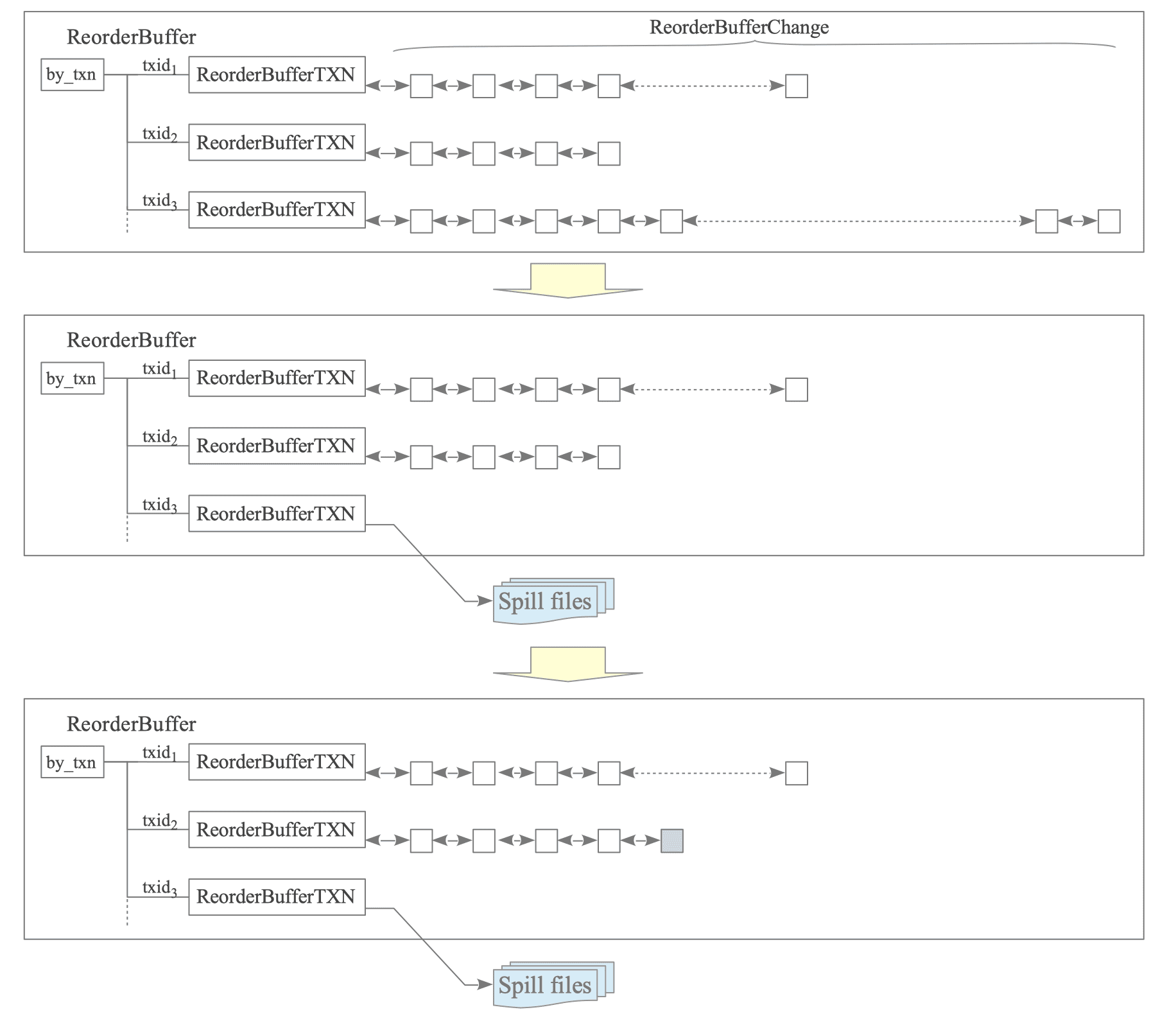
Figure 12.23. Memory management in the ReorderBuffer and spilling to disk.
- [1] A new WAL record from $\text{txid}_{2}$ is being appended, but the ReorderBuffer has already reached its capacity.
- [2] The system identifies $\text{txid}_{3}$ as the transaction with the most accumulated changes. Its changes are serialized to a spill file, and the associated memory is released.
- [3] The changes for $\text{txid}_{2}$ are successfully added to the ReorderBuffer using the newly available space.
PostgreSQL prioritizes spilling the “heaviest” transaction rather than flushing all transactions simultaneously. This approach minimizes disk I/O while effectively keeping memory usage within the allowed limits.
12.4.4.2. Spill File Structure and Naming Conventions
Spill files are stored within the replication slot directory:
$PGDATA/pg_replslot/<slot_name>/
    \-+-- xid-856-lsn-0-6000000.spill
      |-- xid-856-lsn-0-7000000.spill
      +-- xid-856-lsn-0-8000000.spill
The naming convention for these files allows unique identification by transaction ID and LSN range:
Format: xid-[XID]-lsn-[LSN_HIGH]-[LSN_LOW].spill
- XID: The transaction ID (represented in decimal).
- LSN_HIGH: The upper 32 bits of the LSN (represented in hexadecimal).
- LSN_LOW: The lower 32 bits of the LSN (represented in hexadecimal).
Practical Example:
$ ls -l -h $PGDATA/pg_replslot/myslot/
total 68M
-rw------- 1 postgres postgres  200 Mar 24 08:12 state
-rw------- 1 postgres postgres  30M Mar 24 08:12 xid-856-lsn-0-6000000.spill
-rw------- 1 postgres postgres  34M Mar 24 08:12 xid-856-lsn-0-7000000.spill
-rw------- 1 postgres postgres 4.5M Mar 24 08:12 xid-856-lsn-0-8000000.spill