1.2. Physical Structure of Database Cluster
The logical structure described in the previous section is physically represented by a directory structure and data files.
A database cluster is basically a single directory, referred to as the base directory, except for tablespaces described later. It contains several subdirectories and many files. Executing the initdb utility to initialize a new database cluster creates a base directory under the specified location. The path of the base directory is usually set in the environment variable PGDATA.
Figure 1.2 shows an example of a database cluster in PostgreSQL. A database is a subdirectory under the base directory, and each table or index is at least one file stored under its respective database subdirectory. Several other subdirectories contain specific data and configuration files.
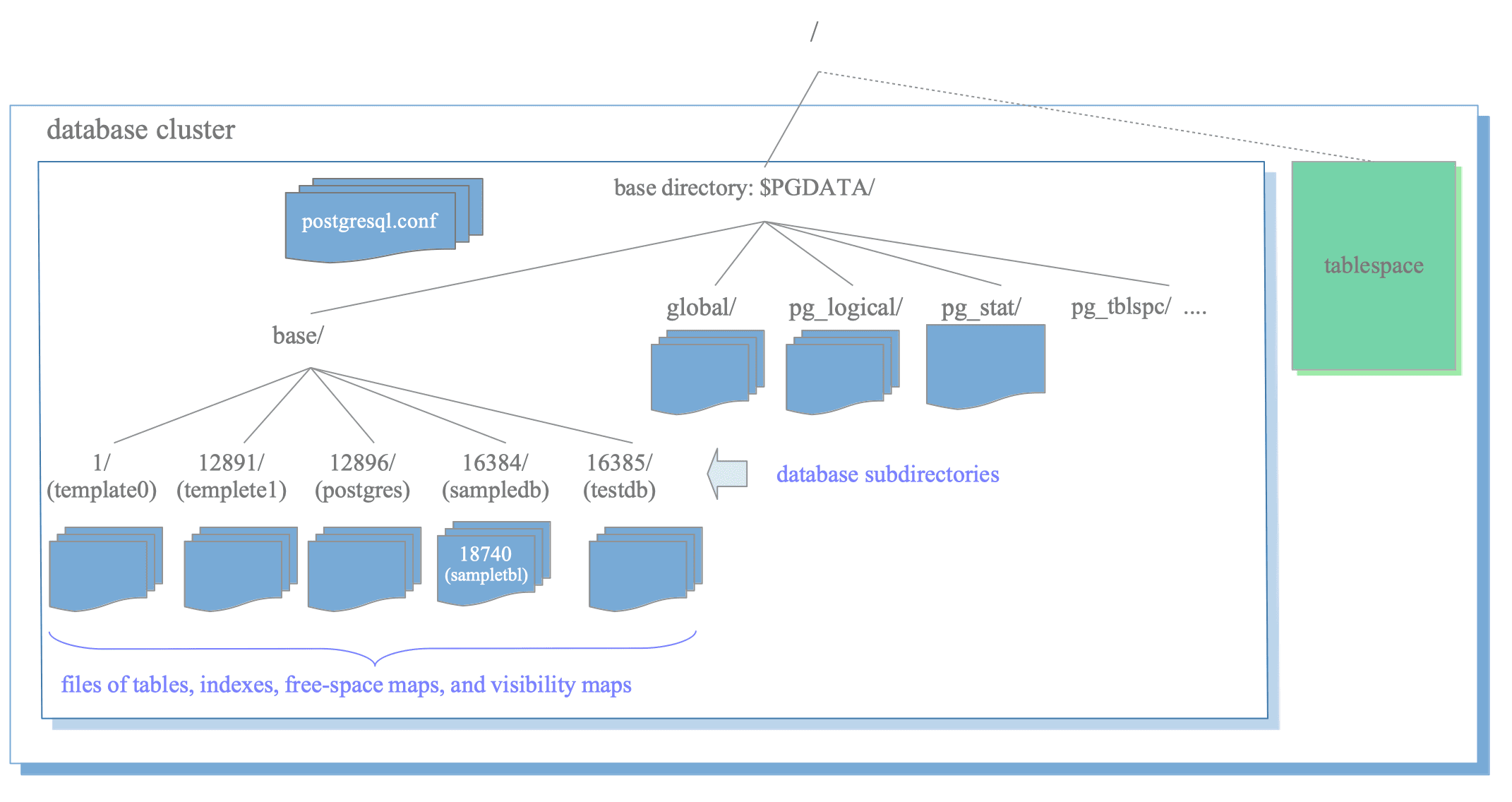
Figure 1.2. An example of database cluster.
While PostgreSQL supports tablespaces, the meaning of the term differs from other RDBMSs. A tablespace in PostgreSQL is a single directory that contains data outside the base directory.
In the following subsections, the layout of a database cluster, databases, files associated with tables and indexes, and tablespaces in PostgreSQL are described.
1.2.1. Layout of a Database Cluster
The base directory contains several files and subdirectories that store cluster-wide information and database-specific data. Table 1.1 lists the main entries and their purposes.
| files | description |
|---|---|
| PG_VERSION | A file containing the major version number of PostgreSQL. |
| current_logfiles | A file recording the log file(s) currently written to by the logging collector. |
| pg_hba.conf | A file to control PostgreSQL's client authentication. |
| pg_ident.conf | A file to control PostgreSQL's user name mapping. |
| postgresql.conf | A file to set configuration parameters. |
| postgresql.auto.conf | A file used for storing configuration parameters that are set in ALTER SYSTEM. (versions 9.4 or later) |
| postmaster.opts | A file recording the command line options the server was last started with. |
| subdirectories | description |
| base/ | Subdirectory containing per-database subdirectories. |
| global/ | Subdirectory containing cluster-wide tables, such as pg_database and pg_control. |
| pg_commit_ts/ | Subdirectory containing transaction commit timestamp data. (versions 9.5 or later) |
| pg_clog/ (versions 9.6 or earlier) | Subdirectory containing transaction commit state data. It is renamed to pg_xact in version 10. |
| pg_dynshmem/ | Subdirectory containing files used by the dynamic shared memory subsystem. (versions 9.4 or later) |
| pg_logical/ | Subdirectory containing status data for logical decoding. (versions 9.4 or later) |
| pg_multixact/ | Subdirectory containing multitransaction status data. (used for shared row locks) |
| pg_notify/ | Subdirectory containing LISTEN/NOTIFY status data. |
| pg_repslot/ | Subdirectory containing replication slot data. Replication Slots will be described in Section 11.4. (versions 9.4 or later) |
| pg_serial/ | Subdirectory containing information about committed serializable transactions. (versions 9.1 or later) |
| pg_snapshots/ | Subdirectory containing exported snapshots. The PostgreSQL's function pg_export_snapshot creates a snapshot information file in this subdirectory. (versions 9.2 or later) |
| pg_stat/ | Subdirectory containing permanent files for the statistics subsystem. |
| pg_stat_tmp/ | Subdirectory containing temporary files for the statistics subsystem. |
| pg_subtrans/ | Subdirectory containing subtransaction status data. |
| pg_tblspc/ | Subdirectory containing symbolic links to tablespaces. |
| pg_twophase/ | Subdirectory containing state files for prepared transactions. |
| pg_wal/ (versions 10 or later) | Subdirectory containing WAL (Write-Ahead Logging) segment files. It is renamed from pg_xlog in Version 10. WAL will be described in Chapter 9. |
| pg_xact/ (versions 10 or later) | Subdirectory containing transaction commit state data. It is renamed from pg_clog in Version 10. CLOG will be described in Section 5.4. |
| pg_xlog/ (versions 9.6 or earlier) | Subdirectory containing WAL (Write-Ahead Logging) segment files. It is renamed to pg_wal in Version 10. |
In version 10 (2017), the subdirectories pg_xlog and pg_clog were renamed to pg_wal and pg_xact, respectively.
This change was made because users unfamiliar with PostgreSQL occasionally deleted these directories, mistaking them for regular log storage folders.
1.2.2. Layout of Databases
Each database is a subdirectory located under the base directory. The names of these subdirectories are identical to their respective OIDs. For example, if the database “sampledb” has an OID of 16384, its subdirectory name is also 16384.
$ cd $PGDATA
$ ls -ld base/16384
drwx------  213 postgres postgres  7242  8 26 16:33 16384
1.2.3. Layout of Files Associated with Tables and Indexes
Each table and index is stored in a single file under its database directory if its size is under 1 GB. Tables and indexes are managed internally by their OIDs, while their physical data files are managed by an identifier called relfilenode. Although a relfilenode usually matches its corresponding OID, this is not always the case; the details are described below.
The following example shows the OID and relfilenode of the table “sampletbl”:
sampledb=# SELECT relname, oid, relfilenode FROM pg_class WHERE relname = 'sampletbl';
  relname  |  oid  | relfilenode
-----------+-------+-------------
 sampletbl | 18740 |       18740
(1 row)
In this case, the OID and relfilenode values are identical.
The physical data file path for “sampletbl” is $PGDATA/base/16384/18740.
$ cd $PGDATA
$ ls -la base/16384/18740
-rw------- 1 postgres postgres 8192 Apr 21 10:21 base/16384/18740
The built-in function pg_relation_filepath() returns the relative file path of the relation associated with a specified OID or name.
sampledb=# SELECT pg_relation_filepath('sampletbl');
 pg_relation_filepath
----------------------
 base/16384/18740
(1 row)
The relfilenode values of tables and indexes change when certain commands are issued, such as TRUNCATE, REINDEX, or CLUSTER. For example, if we truncate the table “sampletbl”, PostgreSQL assigns a new relfilenode (18812) to the table, removes the old data file (18740), and creates a new one (18812).
sampledb=# TRUNCATE sampletbl;
TRUNCATE TABLE

sampledb=# SELECT relname, oid, relfilenode FROM pg_class WHERE relname = 'sampletbl';
  relname  |  oid  | relfilenode
-----------+-------+-------------
 sampletbl | 18740 |       18812
(1 row)
1.2.3.1. Segment Files
When the file size of a table or index exceeds 1 GB, PostgreSQL creates a new segment file named relfilenode.1. If that file is also filled, PostgreSQL creates relfilenode.2, and so on.
$ cd $PGDATA
$ ls -la -h base/16384/19427*
-rw------- 1 postgres postgres 1.0G  Apr  21 11:16 data/base/16384/19427
-rw------- 1 postgres postgres 45M Apr 21 11:20 data/base/16384/19427.1The maximum file size for tables and indexes can be changed using the “–with-segsize” configuration option when building PostgreSQL from source.
1.2.3.2. Free Space Map (FSM) and Visibility Map (VM)
Each table typically has two associated auxiliary files, suffixed with “_fsm” and “_vm”. These are the free space map and the visibility map, respectively.
The free space map (FSM) stores information regarding the available capacity of each page within the table file. The visibility map (VM) tracks the visibility status of each page. (Further details are available in Sections 5.3.4 and 6.2.)
Indexes only have individual free space maps but do not have visibility map.
A specific example of these foles is shown below:
$ cd $PGDATA
$ ls -la base/16384/18751*
-rw------- 1 postgres postgres  8192 Apr 21 10:21 base/16384/18751
-rw------- 1 postgres postgres 24576 Apr 21 10:18 base/16384/18751_fsm
-rw------- 1 postgres postgres  8192 Apr 21 10:18 base/16384/18751_vm
The free space map and visibility map are internally referred to as forks of the relation. The main data file is designated as fork number 0. The free space map is the first fork (fork number 1), and the visibility map is the second fork (fork number 2) of the table’s data file.
1.2.4. Tablespaces
A tablespace in PostgreSQL is an additional data area outside the base directory. This functionality was implemented in version 8.0 (2005).
Figure 1.3 shows the internal layout of a tablespace and its relationship with the main data area.
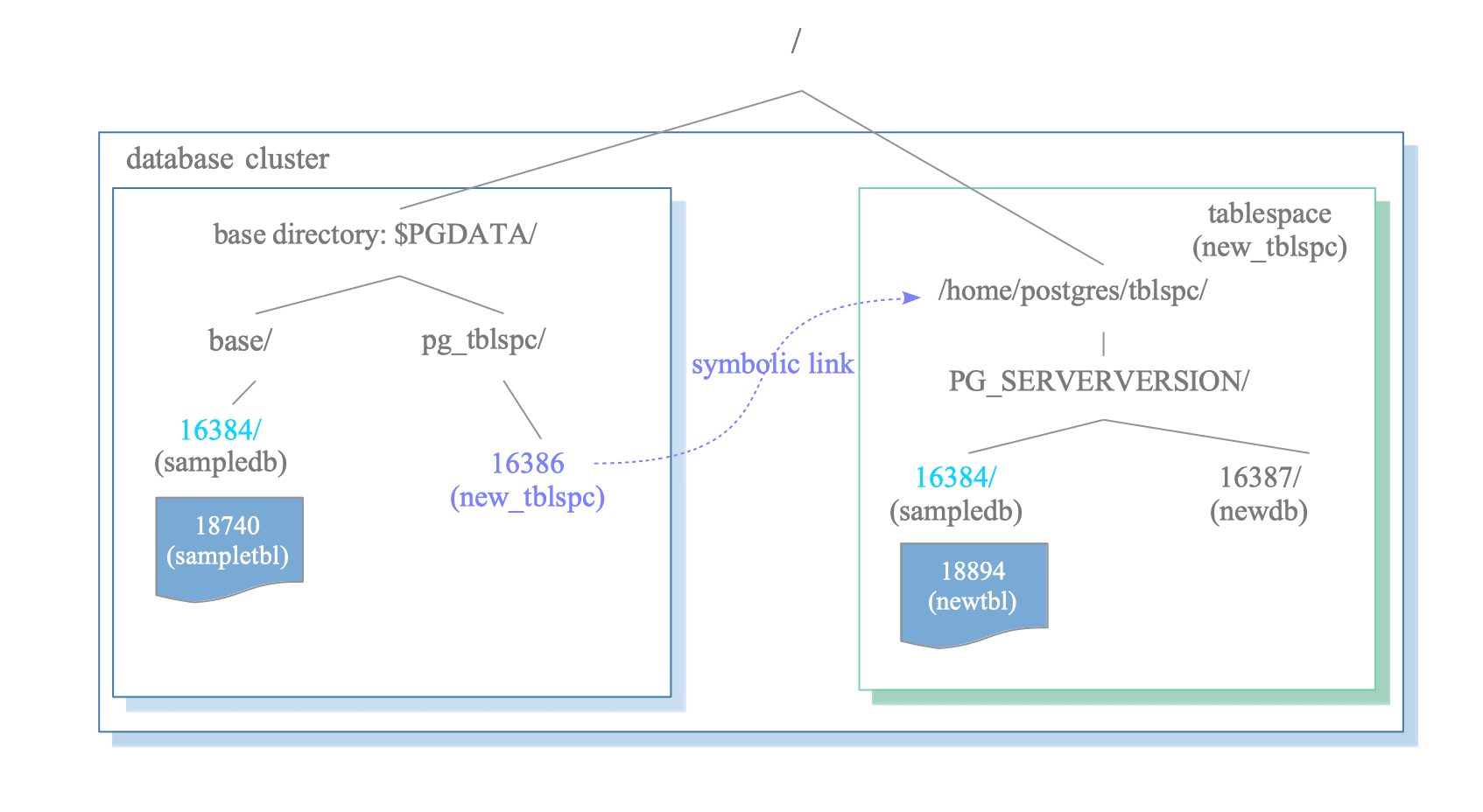
Figure 1.3. A Tablespace in the Database Cluster.
A tablespace is initialized within the directory specified during the execution of the CREATE TABLESPACE command.
Within that specified directory, a version-specific subdirectory is automatically created. The naming convention for this subdirectory is as follows:
- Tablespace Directory Naming Convention:
PG_[Major version]_[Catalogue version number]
For instance,
if a tablespace named “new_tblspc” is created at /home/postgres/tblspc with an OID of 16386,
a subdirectory such as “PG_14_202011044” is generated under that path.
$ ls -l /home/postgres/tblspc/
total 4
drwx------ 2 postgres postgres 4096 Apr 21 10:08 PG_14_202011044
The tablespace directory is linked to the database cluster via a symbolic link located in the pg_tblspc subdirectory. The name of this link corresponds to the OID of the tablespace.
$ ls -l $PGDATA/pg_tblspc/
total 0
lrwxrwxrwx 1 postgres postgres 21 Apr 21 10:08 16386 -> /home/postgres/tblspc
When a new database (OID 16387) is created within the tablespace, its corresponding directory is placed under the version-specific subdirectory:
$ ls -l /home/postgres/tblspc/PG_14_202011044/
total 4
drwx------ 2 postgres postgres 4096 Apr 21 10:10 16387
If a new table is created within a tablespace for a database that otherwise resides in the base directory, a directory named after the database’s OID is first created under the version-specific subdirectory of that tablespace. The new table file is then placed within this newly created directory.
sampledb=# CREATE TABLE newtbl (.....) TABLESPACE new_tblspc;

sampledb=# SELECT pg_relation_filepath('newtbl');
             pg_relation_filepath
---------------------------------------------
 pg_tblspc/16386/PG_14_202011044/16384/18894