8.3. Buffer Manager Locks
The buffer manager uses many locks for various purposes. This section describes the locks necessary for the explanations in subsequent sections.
The locks described in this section are part of a synchronization mechanism for the buffer manager. They do not relate to SQL statements or SQL options.
8.3.1. Buffer Table Locks
BufMappingLock protects the data integrity of the entire buffer table. It is a light-weight lock usable in both shared and exclusive modes. A backend process holds a shared BufMappingLock when searching an entry in the buffer table. The process holds an exclusive lock when inserting or deleting entries.
The BufMappingLock is split into partitions to reduce contention (the default is 128 partitions). Each BufMappingLock partition guards a portion of the hash bucket slots.
Figure 8.8 shows the effect of splitting BufMappingLock. Two backend processes can simultaneously hold different BufMappingLock partitions in exclusive mode to insert new data entries. If BufMappingLock were a single system-wide lock, one process would have to wait for the other to finish.
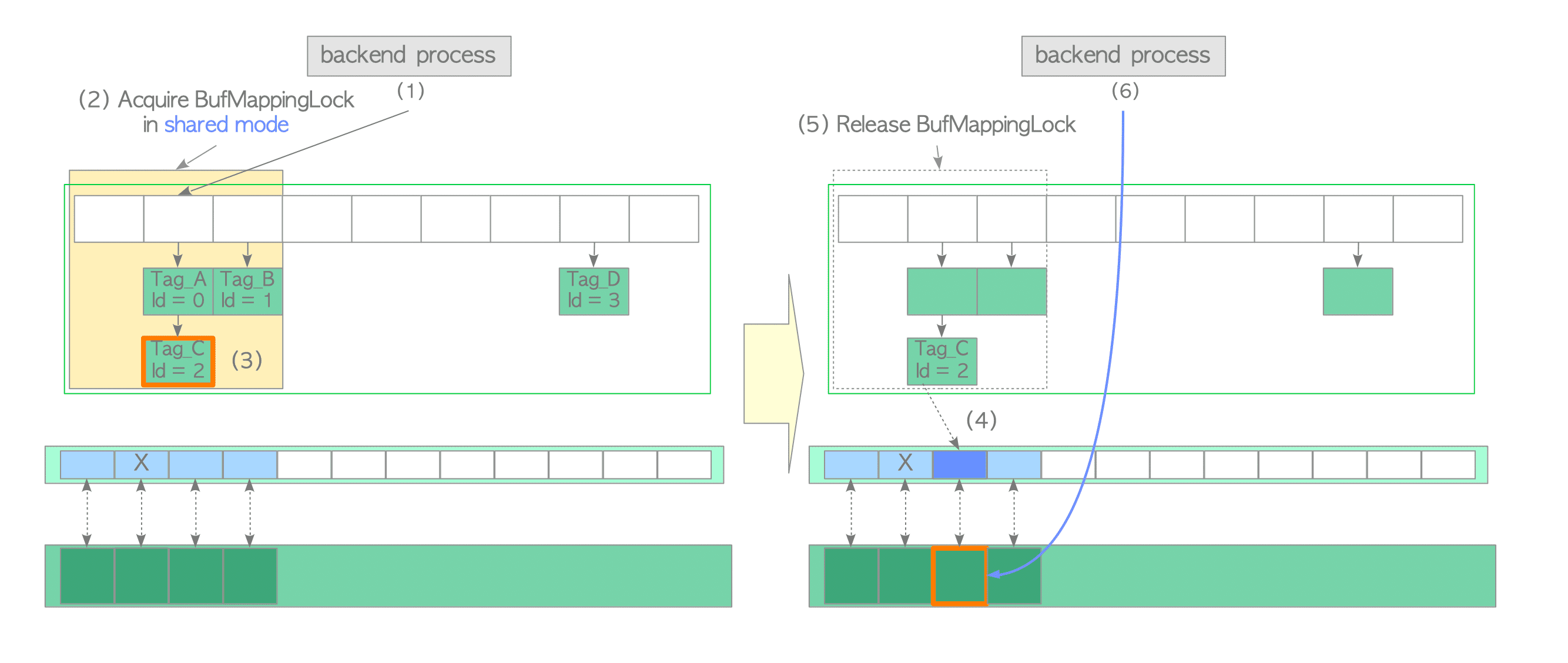
Figure 8.8. Two processes simultaneously acquire the respective partitions of BufMappingLock in exclusive mode to insert new data entries.
The BufMappingLock was introduced in version 8.1. Until version 9.4, the BufMappingLock was split into 16 partitions by default.
Before the introduction of BufMappingLock, PostgreSQL used BufMgrLock. This giant lock mechanism had to be acquired whenever the shared buffer was accessed, which resulted in poor concurrency.
8.3.2. content_lock
Each buffer descriptor uses a lightweight lock, content_lock, to control access to the page stored in the buffer pool slot.
The content_lock is a typical lock that enforces access restrictions. It can be used in shared and exclusive modes.
A backend process acquires a shared content_lock of the buffer descriptor when reading a page.
An exclusive content_lock is acquired when performing the following tasks:
- Inserting rows (tuples) into the stored page or changing the t_xmin/t_xmax fields of tuples within the page.
- Physically removing tuples or compacting free space on the stored page.
- Freezing tuples within the stored page.
The official README file provides more details.