4.1. Overview
To use Foreign Data Wrappers (FDW), administrators must install the appropriate extension and run setup commands such as CREATE FOREIGN TABLE, CREATE SERVER, and CREATE USER MAPPING. For details, refer to the official documentation.
Once the configuration is complete, the functions defined in the extension are invoked during query processing to access the foreign tables.
Figure 4.2 describes the FDW execution process in PostgreSQL.
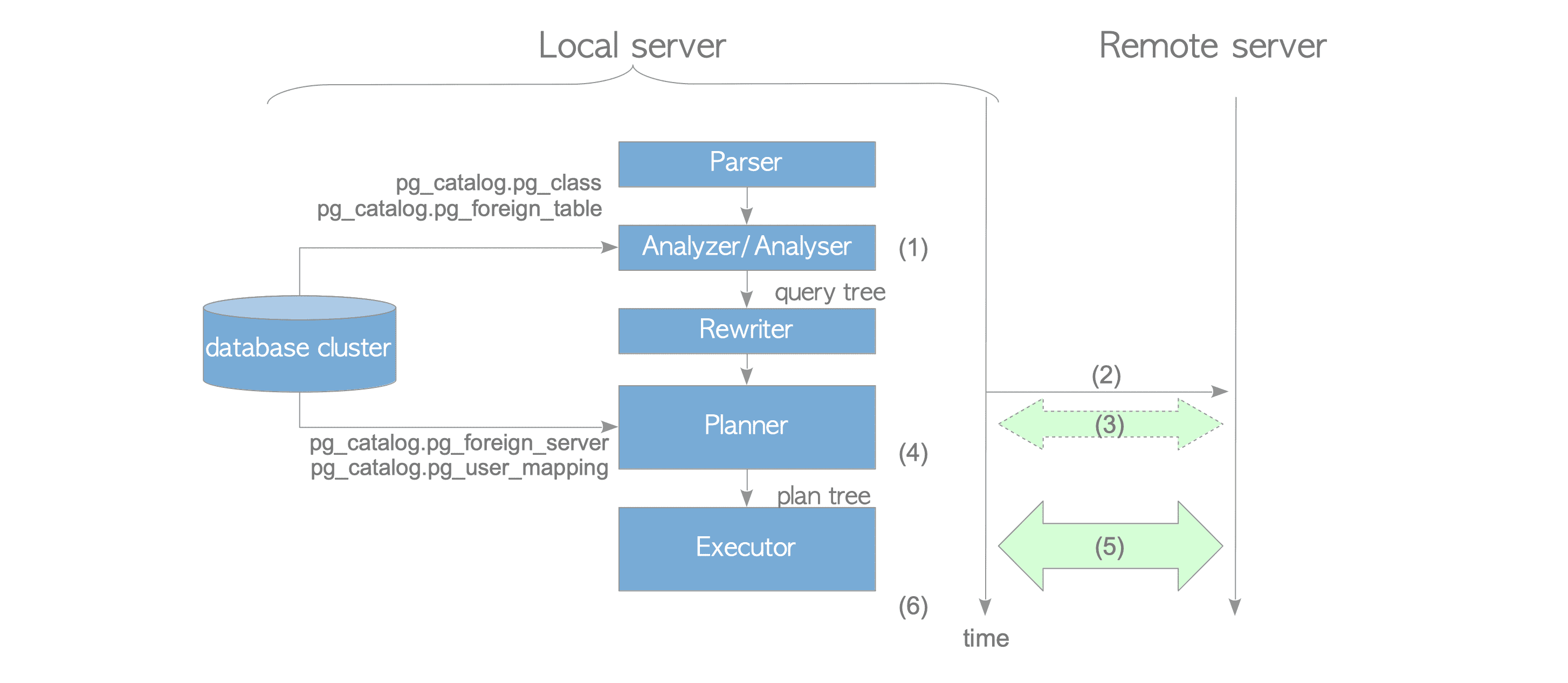
Figure 4.2. How FDWs perform.
- (1) Analysis: The analyzer/analyser creates a query tree from the input SQL.
- (2) Connection: The executor (or planner, if use_remote_estimate option is ‘on’) establishes a connection to the remote server.
- (3) Cost Estimation: If the use_remote_estimate option is ‘on’ (the default is ‘off’), the planner executes EXPLAIN commands on the remote server to estimate the cost of each plan path.
- (4) Deparsing: The planner generates a plain text SQL statement from the plan tree; this process is internally referred to as deparsing.
- (5) Execution: The executor sends the plain text SQL statement to the remote server and receives the results.
The executor then processes the received data as necessary. For instance, if a multi-table query is executed, the executor performs join processing between the received remote data and other local or foreign tables.
The details of these processes are described in the following sections.
4.1.1. Creation of a Query Tree
The analyzer creates the query tree of the input SQL by utilizing the definitions of the foreign tables. These definitions are stored in the pg_catalog.pg_class and pg_catalog.pg_foreign_table catalogs, which are populated via the CREATE FOREIGN TABLE or IMPORT FOREIGN SCHEMA commands.
4.1.2. Establishing a Connection to the Remote Server
To establish a connection, the executor (or planner, if use_remote_estimate option is ‘on’) utilizes a library specific to the remote database type. For instance, postgres_fdw uses the libpq library to connect to remote PostgreSQL servers. Similarly, the mysql_fdw extension utilizes the libmysqlclient library to connect to MySQL servers.
The connection parameters — including the username, server IP address, and port number — are stored in the pg_catalog.pg_user_mapping and pg_catalog.pg_foreign_server catalogs. These parameters are defined using the CREATE USER MAPPING and CREATE SERVER commands.
4.1.3. Cost Estimation via Remote EXPLAIN (Optional)
PostgreSQL’s FDW feature supports obtaining statistics from foreign tables to improve the creation of a query plan. Several FDW extensions, such as postgres_fdw, mysql_fdw, tds_fdw, and jdbc2_fdw, utilize these statistics.
If the ‘use_remote_estimate’ option is set to ‘on’ via the ALTER SERVER command, the planner requests plan costs from the remote server by executing the EXPLAIN command. Otherwise, the planner relies on default embedded constant values for cost estimation.
localdb=# ALTER SERVER remote_server_name OPTIONS (use_remote_estimate 'on');While several extensions attempt to use remote EXPLAIN values, postgres_fdw is uniquely capable of accurately reflecting these results because the PostgreSQL EXPLAIN command provides both start-up and total costs.
In contrast, the EXPLAIN output from other DBMS types often lacks sufficient detail for PostgreSQL’s planning requirements. For example, MySQL’s EXPLAIN command primarily returns the estimated number of rows, whereas the PostgreSQL planner requires the more comprehensive cost information described in Chapter 3.
4.1.4. Deparesing
During the creation of the plan tree, the planner creates a plain text SQL statement from the scan paths associated with the foreign tables.
For example, Figure 4.3 illustrates the plan tree for the following SELECT statement:
localdb=# SELECT * FROM tbl_a AS a WHERE a.id < 10;As shown in Figure 4.3, the ForeignScan node — which is linked to the plan tree of the PlannedStmt — stores a plain text SELECT statement.
In this process, postgres_fdw reconstructs the SQL text from the query tree created during parsing and analysis. This reconstruction process is referred to as deparsing in PostgreSQL.
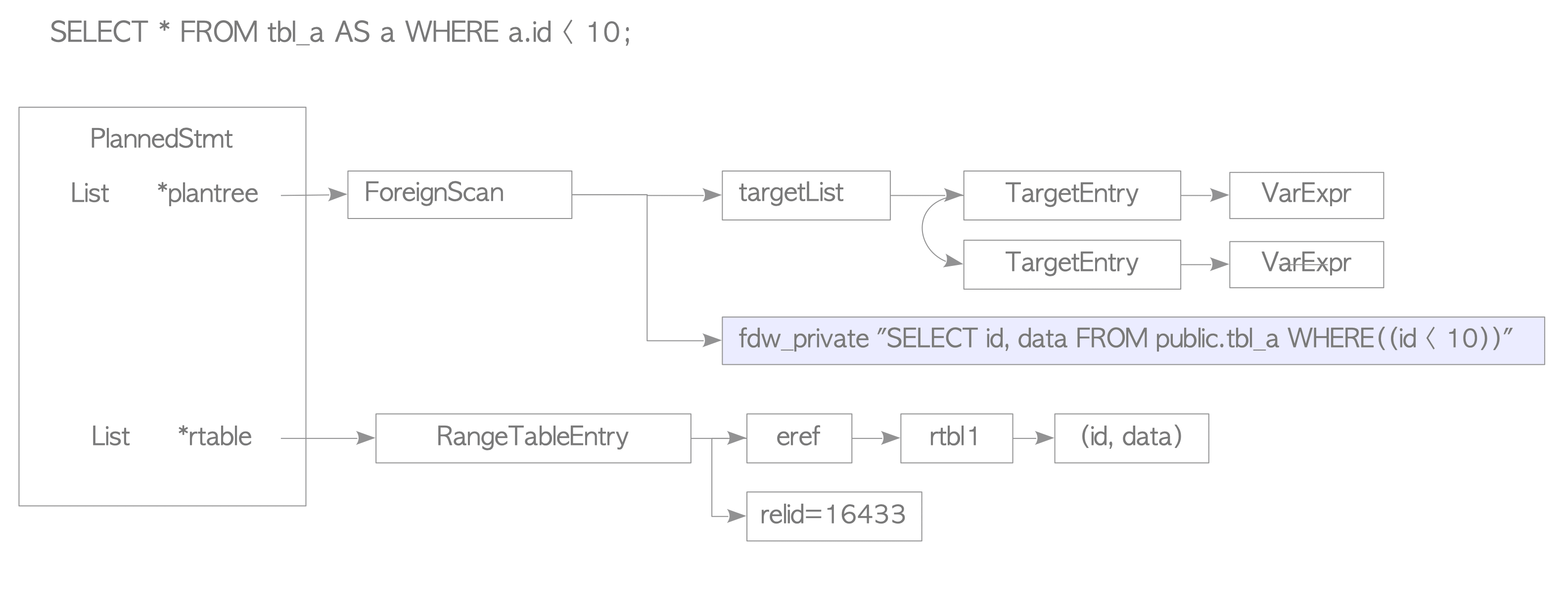
Figure 4.3. Example of the plan tree that scans a foreign table.
Similarly, mysql_fdw creates a SELECT statement compatible with MySQL from the query tree. When using redis_fdw or rw_redis_fdw, the process creates a Redis SELECT command command.
4.1.5. Execution and Result Retrieval
After the deparsing process, the executor sends the deparsed SQL statements to the remote server and receives the results.
The method for transmitting SQL statements depends on the implementation of the specific FDW extension. For example, mysql_fdw transmits SQL statements without initiating a formal transaction. The typical sequence for executing a SELECT query in mysql_fdw is illustrated in Figure 4.4.
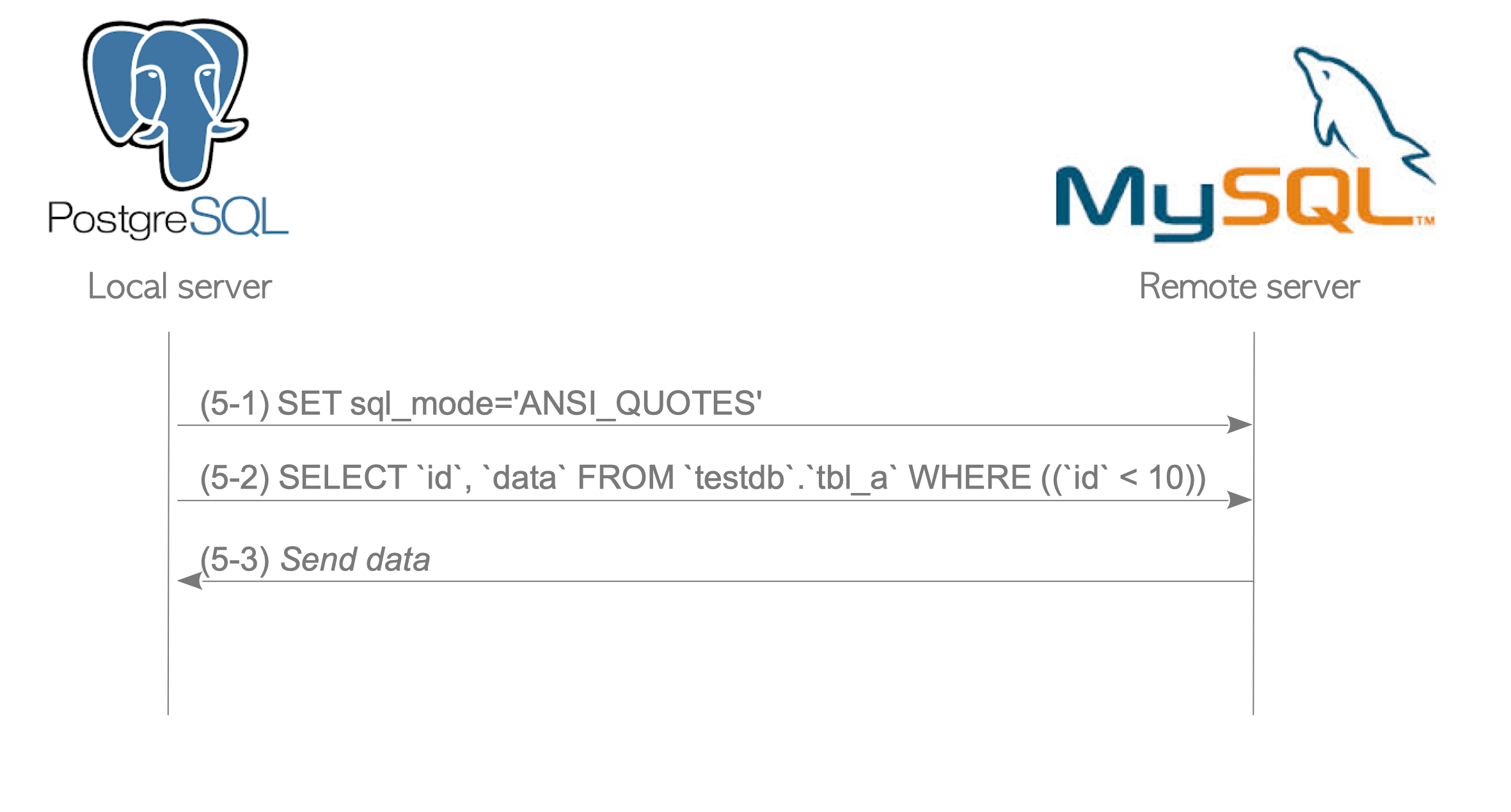
Figure 4.4. Typical sequence of SQL statements to execute a SELECT query in mysql_fdw.
- (5-1) Configuration: Sets the SQL_MODE to ‘ANSI_QUOTES’.
- (5-2) Transmission: Sends the SELECT statement to the remote server.
- (5-3) Retrieval and Conversion: Receives the results from the remote server.
At this stage, mysql_fdw converts the data into a format readable by PostgreSQL.
All FDW extensions must implement a conversion feature to ensure the remote data is compatible with the PostgreSQL executor.
In contrast, the communication sequence in postgres_fdw is more complex, as it involves transaction management and cursors. The typical sequence for a SELECT query in postgres_fdw is shown in Figure 4.5.
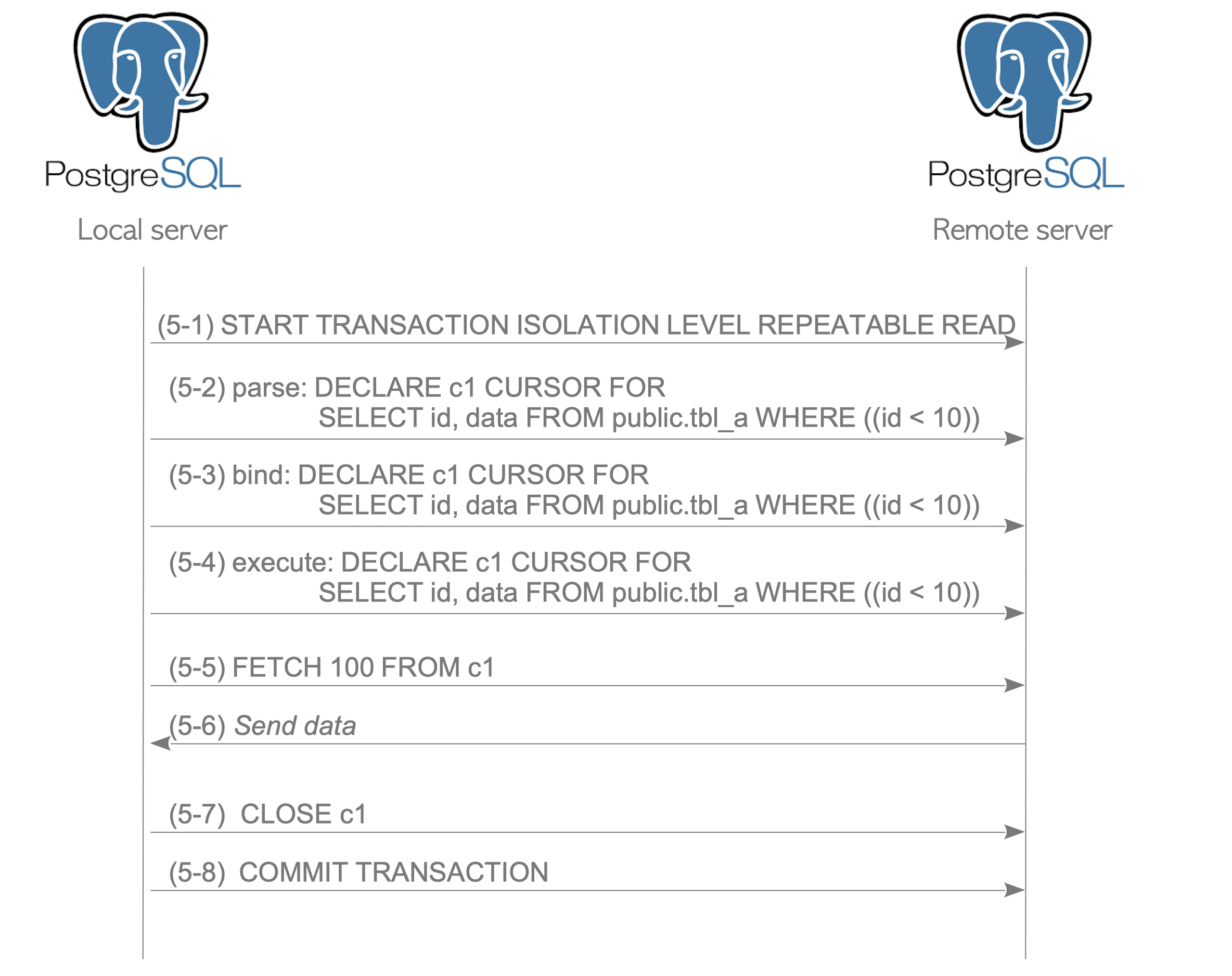
Figure 4.5. Typical sequence of SQL statements to execute a SELECT query in postgres_fdw.
- (5-1) Transaction Start: Initiates a remote transaction. The default remote isolation level is REPEATABLE READ. However, if the local transaction isolation level is set to SERIALIZABLE, the remote transaction is also set to SERIALIZABLE.
- (5-2)-(5-4) Cursor Declaration: Declares a cursor for the SQL statement. Remote queries are generally executed via cursors to manage data flow efficiently.
- (5-5) Fetching: Executes FETCH commands to retrieve the results. By default, 100 rows are retrieved per FETCH command.
- (5-6) Retrieval: Receives the data from the remote server.
- (5-7) Cursor Closure: Closes the cursor after all required rows are retrieved.
- (5-8) Commitment: Commits the remote transaction.
The official documentation explains why REPEATABLE READ is the default remote transaction isolation level.