10.5. Incremental Backup
Regular backups are essential for normal operation. However, maintaining multiple full backups consumes significant storage space.
To address this issue, PostgreSQL introduced incremental backups in version 17 (2024). An incremental backup saves only the changed portions of the files modified since the preceding backup.
The following subsections describe the overview of incremental backups, the process of creating them with pg_basebackup, and the internal data format.
10.5.1. Incremental Backup Overview
10.5.1.1. Taking Incremental Backup
Incremental backup relies on a full backup and WAL summary files. These summary files are collected by the WAL summarizer, which is described in Section 9.6.2. This section begins by explaining the initial full backup.
-
Taking the full backup:
After do_pg_backup_start() is issued, a full backup is taken. This backup contains all relation files. This explanation assumes the REDO point of the full backup is $REDO_{full}$. -
Tracking changes:
The WAL Summarizer process tracks changes to all database blocks and writes these modifications to WAL summary files. -
Taking the incremental backup:
Assume the REDO point of this incremental backup is $REDO_{inc01}$. Using the summary files generated between $REDO_{full}$ and $REDO_{inc01}$, the incremental backup saves only the changed blocks instead of the entire relation files.
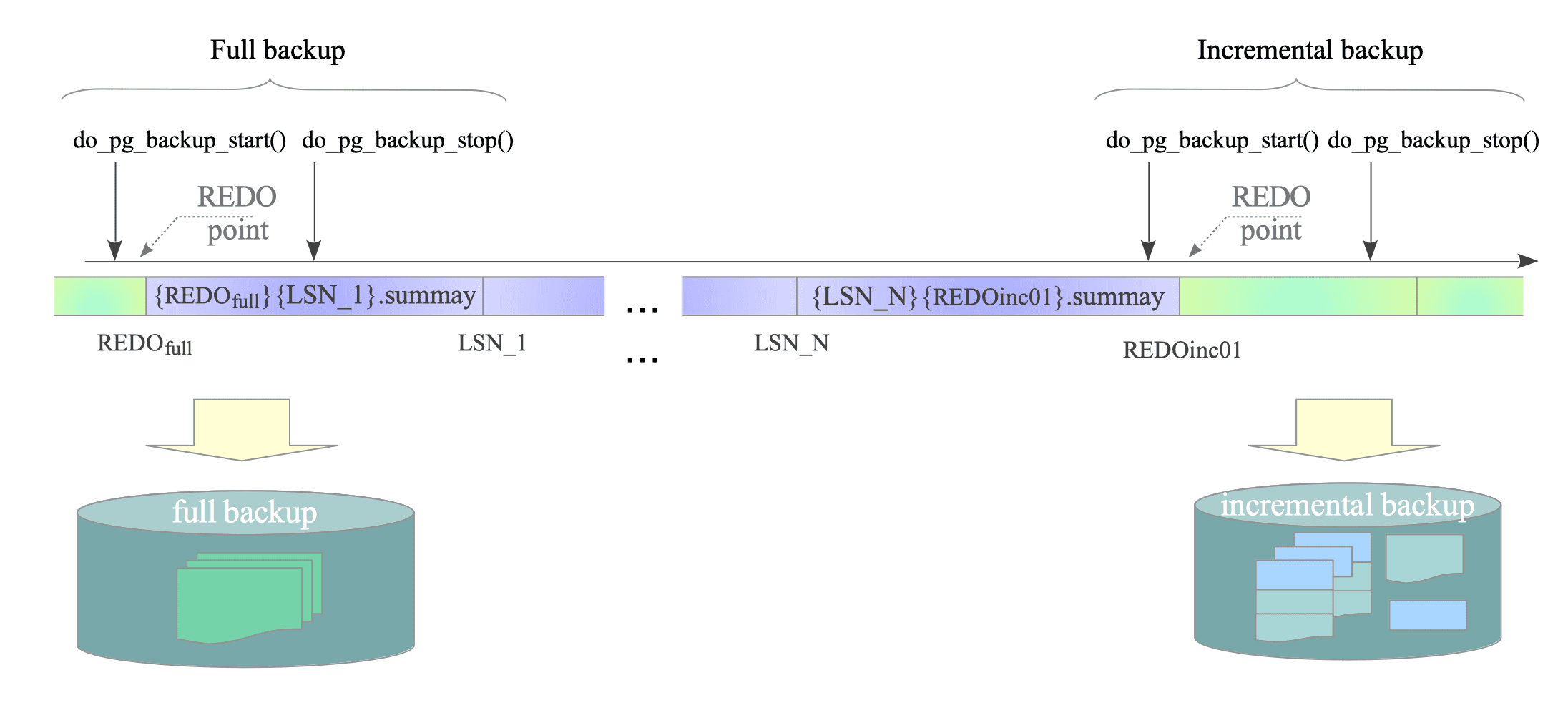
Figure 10.7. Concept of Taking an Incremental Backup.
Two important points regarding this process:
-
Relation and visibility map files are stored as incremental backup files, while free-space map (FSM) files are always backed up entirely. This is because FSM forks are not tracked by the WAL Summarizer, as mentioned in Section 9.6.2.
-
If a relation is created after the preceding backup, the system backs up the entire relation file.
Incremental backup files follow these naming conventions:
- Relation:
INCREMENTAL.{oid} - Visibility Map:
INCREMENTAL.{oid}_vm
For instance, the incremental backup file for Table t1 (OID = 16551) is named ‘INCREMENTAL.16551’.
The following example shows the full and incremental backup files for t1:
$ ls -la -h backup/full/base/16425/ | grep "16551$"
-rw------- 1 postgres postgres 32K Oct 17 11:11 16551
16551
$ ls -la -h backup/inc01/base/16425/ | grep "16551$"
-rw------- 1 postgres postgres 24K Oct 17 11:20 INCREMENTAL.16551
INCREMENTAL.16551
10.5.1.2. Reconstructing Backup
PostgreSQL provides the pg_combinebackup utility to reconstruct a base backup from incremental backups.
If a full backup is located at ‘/usr/local/pgsql/backup/full’ and an incremental backup is at ‘/usr/local/pgsql/backup/inc01’, the following command reconstructs the base backup under ‘/usr/local/pgsql/reconstructed’:
$ pg_combinebackup -d -n -o /usr/local/pgsql/reconstructed  \
>    /usr/local/pgsql/backup/full/  \
>    /usr/local/pgsql/backup/inc01/
Figure 10.8 illustrates how pg_combinebackup reconstructs a base backup. Essentially, pg_combinebackup applies the block changes stored in the incremental backup file to the original relation file.
For instance, if Table t1 (OID=16551) exists in the full backup and an incremental backup contains INCREMENTAL.16551’, pg_combinebackup overwrites the changed blocks (e.g., the 0th and 3rd blocks) from the incremental file onto the original ‘16551’ file.
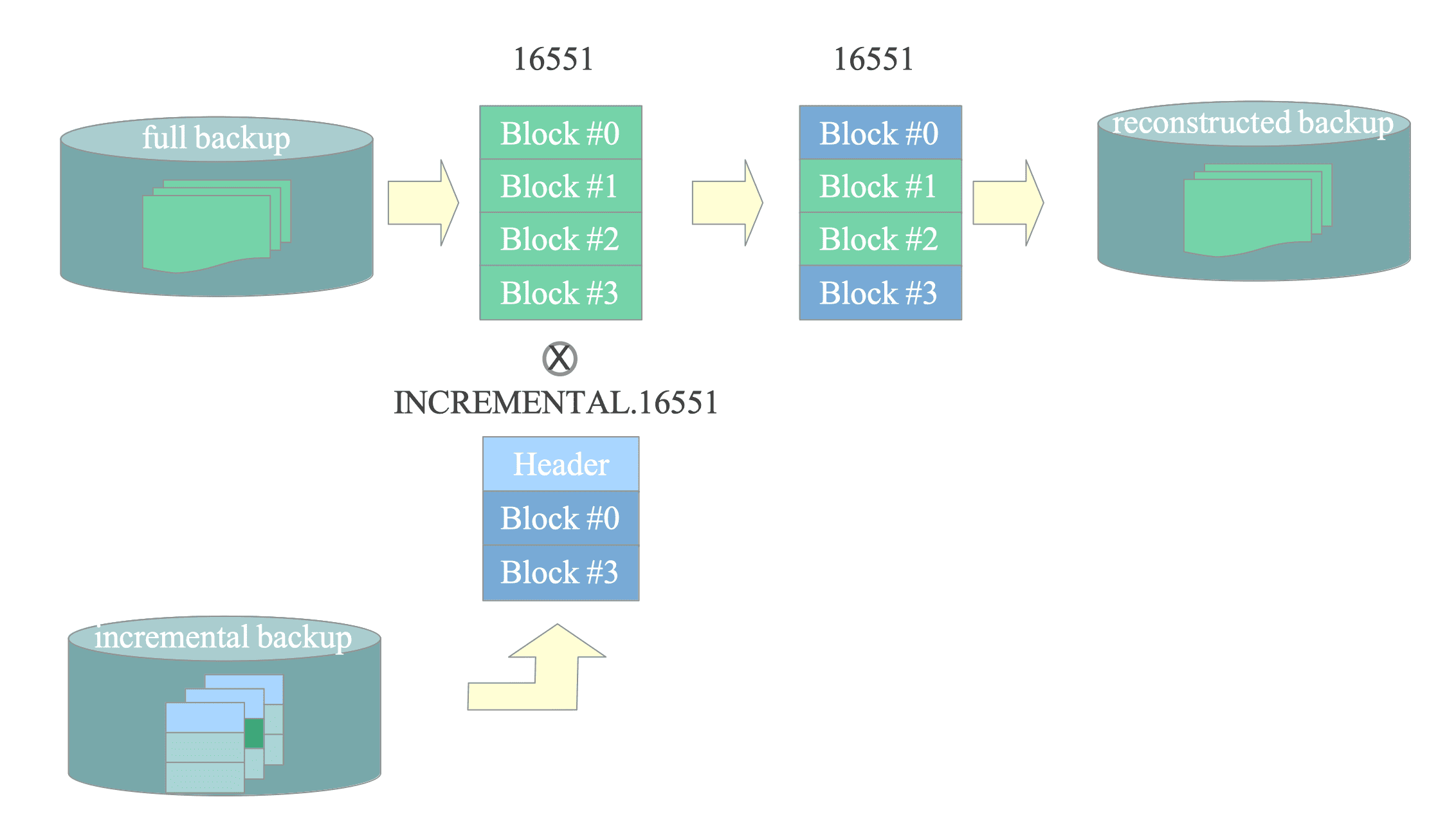
Figure 10.8. Concept of Reconstructing a Base Backup.
10.5.2. How to Take Incremental Backups
To take an incremental backup, use the ‘–incremental’ option followed by the path to the preceding backup’s manifest file.
For example, to take an incremental backup from host 192.168.1.10 to the local directory ‘/usr/local/pgsql/backup/inc01’ based on the full backup at ‘/usr/local/pgsql/backup/full’, execute the following command:
$ pg_basebackup -h 192.168.1.10 -p 5432 \
>   --incremental /usr/local/pgsql/backup/full/backup_manifest \
>   -D /usr/local/pgsql/backup/inc01 -X stream -P -v
Figure 10.9 shows the sequence of how the pg_basebackup takes an incremental backup:
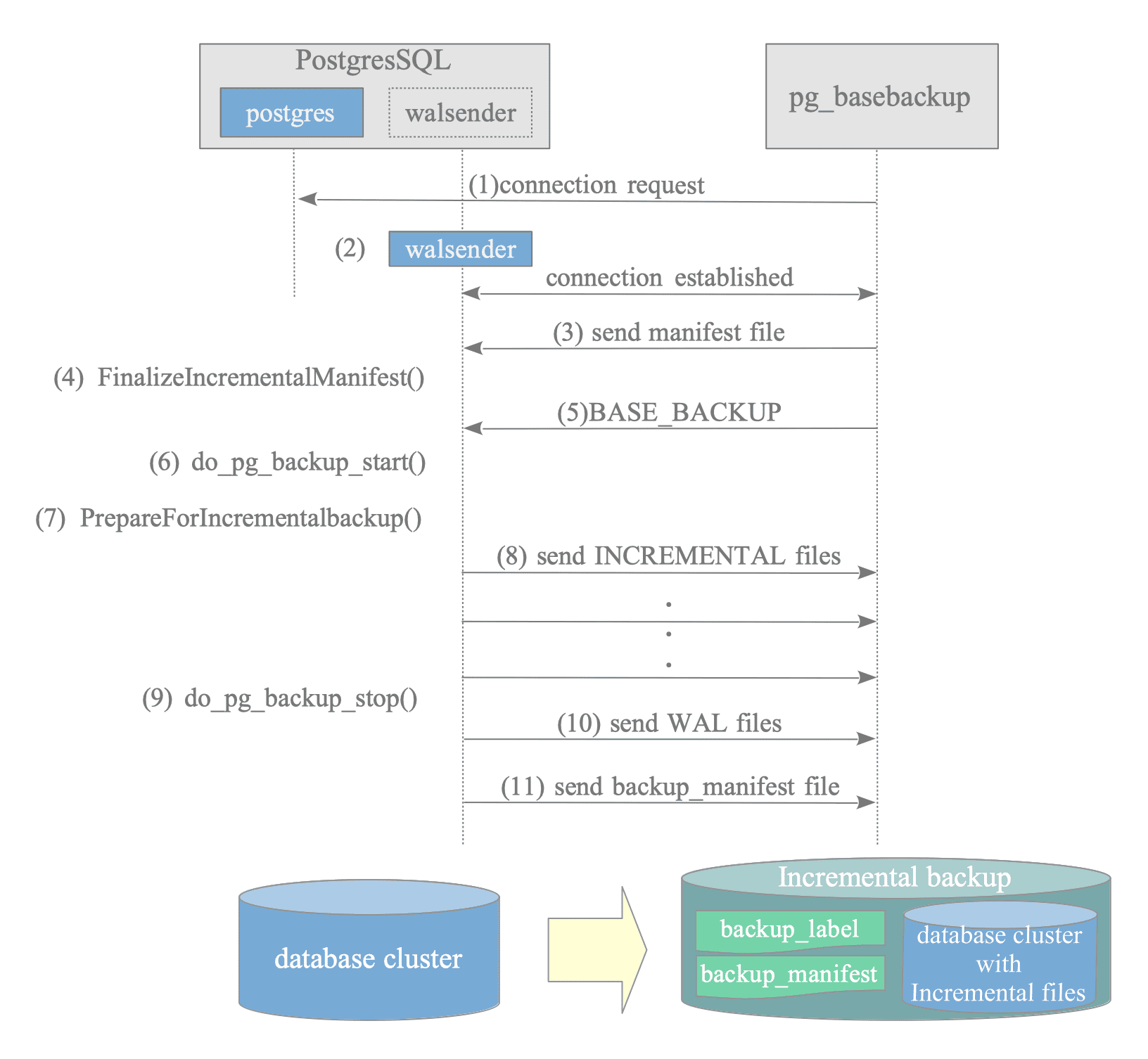
Figure 10.9. The sequence of the pg_basebackup in incremental backup mode.
- (1) Connection request
- (2) Create walsender process
- (3) Send backup manifest file:
pg_basebackup sends the backup_manifest of the preceding backup. - (4) Initialize incremental backup parameters:
The walsender process calls FinalizeIncrementalManifest() to retrieve the TimeLine and Start-LSN from the preceding backup’s manifest file. - (5) Base backup request
- (6) Execute do_pg_backup_start()
- (7) Identify modified blocks:
The walsender process calls PrepareForIncrementalbackup() to generate a list of all modified relation blocks. It identifies these changes by analyzing summary files from the Start-LSN (retrieved in step 4) to the latest REDO point (generated in step 6). - (8) Send INCREMENTAL files:
The walsender process sends incremental backup files instead of entire relation and visibility-map files. These files consist of a header block and changed blocks, determined by the list created in step 7. - (9) Execute do_pg_backup_stop()
- (10) Send WAL files
- (11) Send backup_manifest file
In step 8, the walsender sends the entire relation file if the relation was created after the preceding backup.
To take the next incremental backup, execute the following command with the ‘–incremental’ option pointing to the previous incremental backup manifest:
$ pg_basebackup -h 192.168.1.10 -p 5432 \
>   --incremental /usr/local/pgsql/backup/inc01/backup_manifest \
>   -D /usr/local/pgsql/backup/inc02 -X stream -P -v
10.5.3. Format of INCREMENTAL File
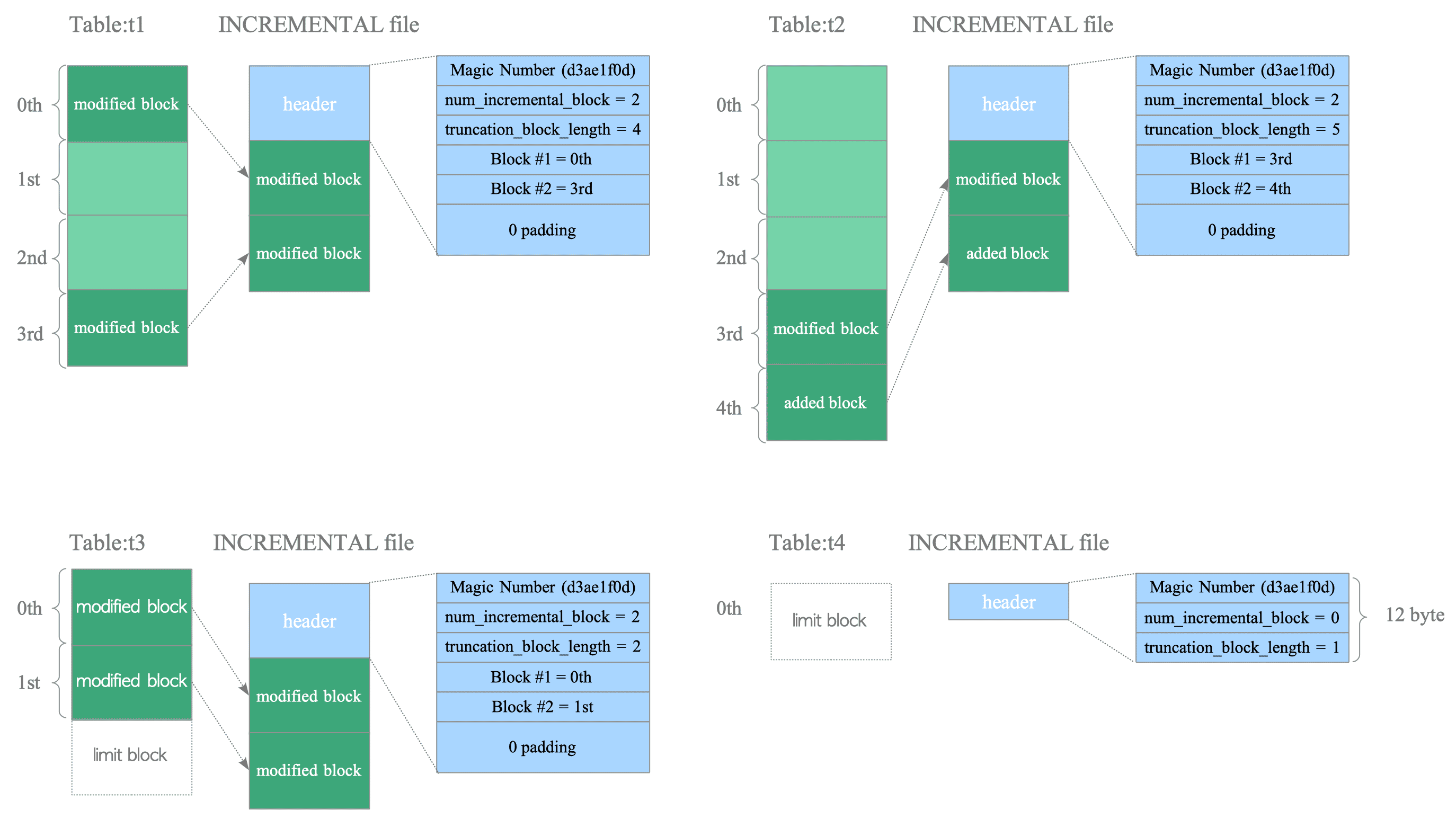
An INCREMENTAL file typically consists of a header block and modified blocks, each 8 KB in size.
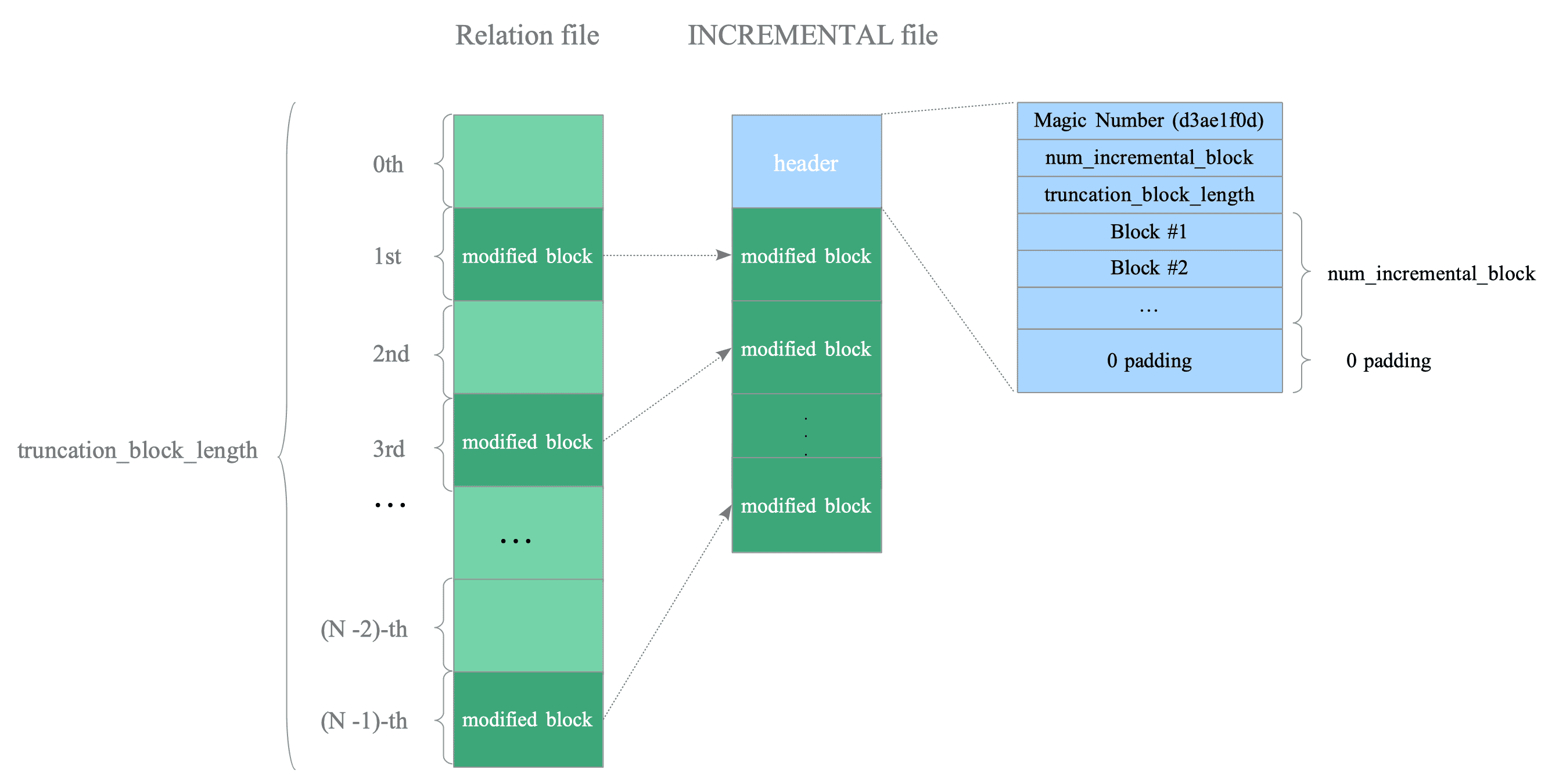
Figure 10.10. INCREMENTAL file format.
A header block contains four types of information:
-
Magic Number: The header begins with ‘0xd3ae1f0d’ to identify it as an incremental backup file.
-
num_incremental_block: The number of modified blocks.
-
truncation_block_length: This value usually represents the total number of blocks in the table and VM corresponding to this file. Depending on internal processing, it may exceed this value. See the source code for details.
-
List of modified block numbers: This stores the numbers of the modified blocks. For instance, if the 0th and 3rd blocks are modified, it stores “0” and “3”.
A header block is typically 8 KB, or a multiple of 8 KB. The block is padded with zeros to maintain 8 KB alignment after the list of block numbers. If the list exceeds 8 KB, PostgreSQL adds additional header blocks.
If a table is truncated, dropped, or unchanged, its header block becomes a 12-byte block containing three fields: a magic number, a num_incremental_block set to 0, and a truncation_block_length of 1. The INCREMENTAL file itself also becomes a 12-byte file containing only this header.
Figure 10.11 shows four examples of INCREMENTAL files, as explained in Section 9.6.2.2: