11.4. Replication Slots
As discussed in Section 11.1.1, replication slots (introduced in version 9.4) ensure that WAL segments and old tuple versions are retained until replication completes.
This section explores the mechanism of replication slots.
Note that although replication slots are fundamental to logical replication, this section does not cover them in that context.
11.4.1. Advantages of Replication Slots in Streaming Replication
In streaming replication, although replication slots are not mandatory, they offer the following advantages compared to wal_keep_size:
-
Ensuring Streaming Replication Works Without Losing Required WAL Segments:
Replication slots track required WAL segments and prevent their removal. In contrast, when using only wal_keep_size, PostgreSQL may remove necessary segments if standbys do not read them for an extended period. -
Maintaining Only the Minimum Necessary WAL Segments:
With replication slots, the pg_wal directory retains only the required WAL segments and removes unnecessary ones. Conversely, wal_keep_size retains a fixed amount of WAL segments regardless of actual requirement.
Since replication slots can retain WAL segments indefinitely, the storage area might fill up in the worst-case scenario, potentially leading to an operating system panic.
To address this issue, version 13 introduced the configuration parameter max_slot_wal_keep_size. This parameter limits the maximum size of WAL segments in the pg_wal directory at checkpoint time.
The key difference between using max_slot_wal_keep_size with replication slots and using wal_keep_size lies in how they manage WAL segments:
- max_slot_wal_keep_size sets a maximum size limit while allowing replication slots to retain only the minimum required amount.
- wal_keep_size specifies a fixed amount of WAL segments to be retained, regardless of whether they are needed or not.
11.4.2. Replication Slots and Related Processes and Files
Replication slots are stored in the memory area allocated within shared memory.
Figure 11.8 illustrates replication slots and the related processes and files:
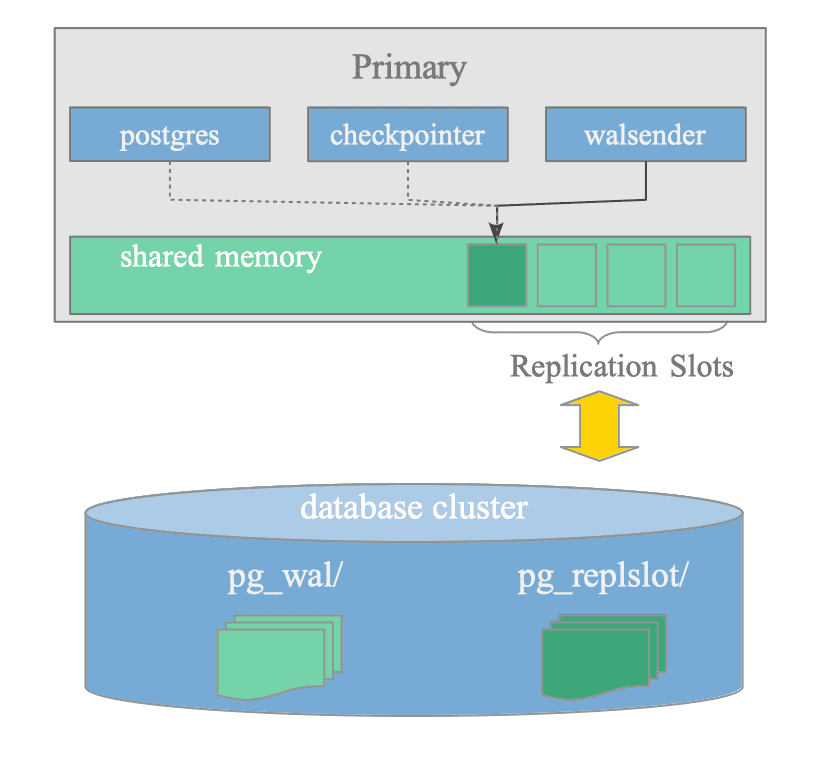
Figure 11.8. Replication Slots and Related Processes and Files.
11.4.2.1. Related Processes
The processes related to replication slots are as follows:
-
Walsender: This process continuously updates the corresponding replication slot to reflect the current state of the standby server’s WAL data.
-
Checkpointer background worker: This process reads the replication slots to determine whether WAL segments can be removed during checkpointing.
-
Postgres backend: This process displays slot information via the pg_replication_slots system view.
11.4.2.2. Related Files
The files related to replication slots are as follows:
-
State files under the pg_replslot directory:
Walsenders regularly save detailed information about their replication slots to state files in this directory. During server restarts, PostgreSQL loads this information back into memory to restore the status of the replication slots. -
WAL segment files under the pg_wal directory.
11.4.3. Data Structure
Replication Slots are defined by the ReplicationSlot structure in slot.h.
Although the structure contains many items, as it is shared between both streaming and logical replication, the main items relevant to streaming replication are as follows:
- active_pid: The PID of the walsender process that manages this slot.
- ReplicationSlotPersistentData data: Items defined by
ReplicationSlotPersistentDatastructure. The main items include:- name: The name of the slot.
- restart_lsn: The oldest LSN that might be required by this replication slot. The checkpointer reads the minimum restart_lsn value across all slots to determine whether WAL segments can be removed.
The ReplicationSlotPersistentData data is regularly saved in the pg_replslot directory.
11.4.4. Starting Replication Slot
Figure 11.9 illustrates the starting sequence of a replication slot:
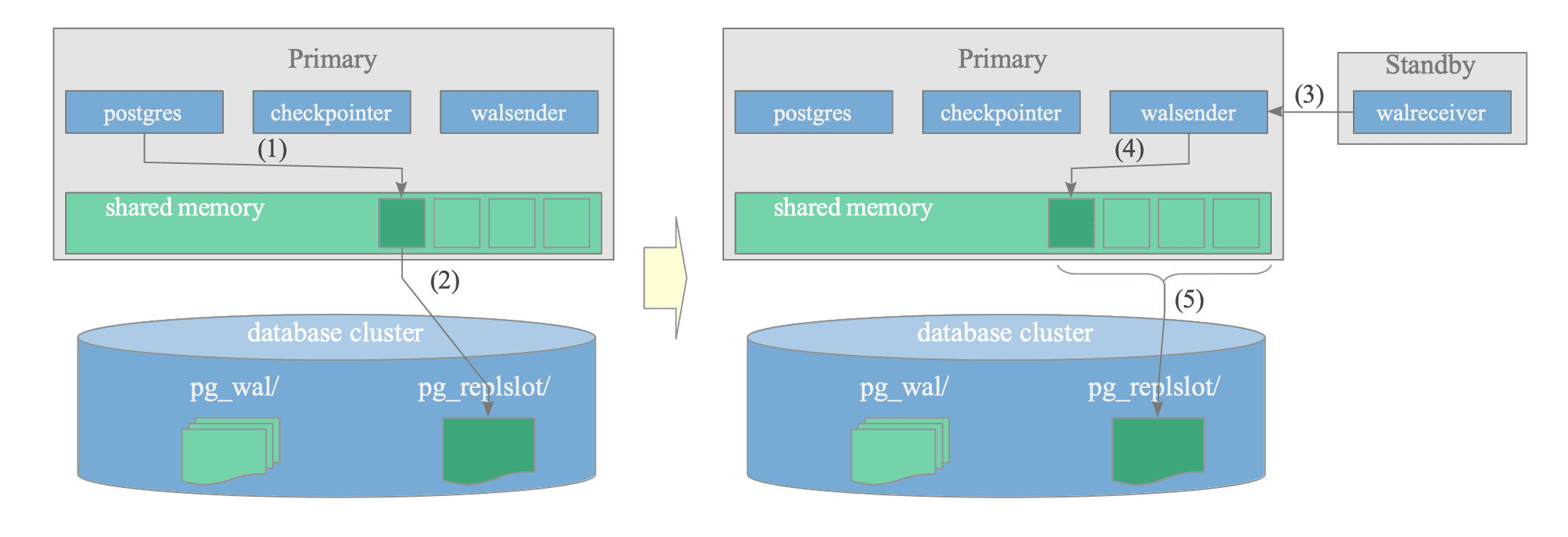
Figure 11.9. Starting Sequence of a Replication Slot.
- (1) Create a (physical) replication slot using the pg_create_physical_replication_slot() function.
Except for the slot name, PostgreSQL sets the data in the replication slot to its default values.
testdb=# SELECT * FROM pg_create_physical_replication_slot('standby_slot'); slot_name | lsn ---------------+----- standby_slot | (1 row) - (2) Write a portion of the slot data in the pg_replslot directory.
The ReplicationSlotPersistentData structure defines this data.
PostgreSQL creates a file named ‘state’ under the subdirectory corresponding to the slot name, as shown below:
$ ls -1 pg_replslot/ standby_slot $ find pg_replslot/ pg_replslot/ pg_replslot/standby_slot pg_replslot/standby_slot/state - (3) (Re)Connect the standby server to the primary server.
To (re)connect the standby server, set the primary_slot_name configuration parameter to the name of the replication slot.
Then, issue the pg_ctl command with the “reload” option:
# standby's postgresql.conf primary_slot_name = 'standby_slot'$ pg_ctl -D $PGDATA_STANDBY reload - (4) Update the replication slot, including fields such as active_pid and restart_lsn.
- (5) Write a portion of the updated slot data in the pg_replslot directory.
11.4.5. Managing Replication Slots
After replication slots are set in shared memory, walsender processes continuously update the slots to reflect the current states of the corresponding standby servers.
Below is an example of the states of the replication slots:
testdb=# \x
Expanded display is on.
testdb=# SELECT * FROM pg_replication_slots;
-[ RECORD 1 ]-------+--------------
slot_name           | standby_slot
plugin              |
slot_type           | physical
datoid              |
database            |
temporary           | f
active              | t
active_pid          | 236772
xmin                | 754
catalog_xmin        |
restart_lsn         | 0/303B968
confirmed_flush_lsn |
wal_status          | reserved
safe_wal_size       |
two_phase           | f
inactive_since      |
conflicting         |
invalidation_reason |
failover            | f
synced              | f
The primary PostgreSQL server regularly saves detailed information about its replication slots to ‘state’ files in the pg_replslot directory.
When the primary server restarts, it loads this saved information back into memory to restore the status of its replication slots.